Thursday, 14 March 2019

RetroChallenge 03/2019: Miner Working


I got the enemies working. Some interesting compromises had to be made to maintain speed. The bat basically patrols the top 3 levels. The boulder bounces on the bottom level. And the snake lurks on a random ladder. It climbs up and down at random intervals adding a little complexity to the player's navigation decision-making. The other two appear randomly from either side. The snake will eventually speed up as you proceed through levels. The other two monsters will also speed up as you go.

Some other surprising features emerged spontaneously as I worked out player movement. You can't move through enemies (a mistake), but then I realized that this allowed for some quirky player dynamics. If you jump up just before getting hit by the boulder you can end up jumping on top of it and possibly running over it.  Just don't fall in front of it or it will roll over you.  You can rest by standing on ladders between platforms and use these refuges to plan your strategy.

Solved the problem with the platforms not always providing a complete path to all the gold. You can plant a few ladders of your own, 3 per level, to make a path. Had to finesse the gold planting routine. It prioritizes planting on upper levels, but will sometimes plant one on the lowest level so that you have to play footsies with the boulder. After every 5 levels you get an extra gold up to a max of five.  Each gold is worth a 100 more than the last one retrieved, so there is some incentive for cleaning a level of its gold.  If you don't collect at least 2 before each fifth level, you don't earn an extra life.

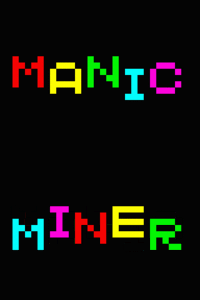
My son Charlie composed a nice SOUND command routine to play "Hall of the Mountain King" from Edvard Grieg. This was the in-game refrain from the original Manic Miner. It gives the player a chance at the beginning of the level to plan initial strategy. I also added a variation of the original game's loading screen.

Not sure what is left to do. Asked Charlie to give me some suggestions for some refinements. Here is what he said:
  • anyway I played it for a bit and got a score of 5200
  • the jumping is the best mechanic
  • the animation is smooth so it's very usable
  • I also like how the arms move for it
  • at one point I was a bit annoyed since I couldn't place a ladder down while I was on a ladder, but that's minor
  • or should I say miner 馃槈
  • also a couple times a snake sat on the exit for a while, which was annoying, but on second thought it sort of made things interesting since I just ended up jumping over boulders for a bit
  • map generation is good
  • only recommendations I can think of for now would be to add labels for the numbers on the bottom, and to maybe add a time bonus for each level (there's a timer and you get extra points for any time left when you finish the level)

Tried labels, but they created a conflict with my key polling and peeking routines, which both use an array K(255), to store codes for using with ON/GOTO commands. Don't want to declare a separate array because each variable brings speed down.  People will just have to figure out the arrangement of numbers: SCORE, LEVEL, BRIDGES,LIVES.  Also don't think a timer is really worth it, as most screens can be completed fairly quickly.

Source can be found on Github:
https://github.com/jggames/trs80mc10/tree/master/quicktype/Arcade/Miner

Monday, 11 March 2019

RetroChallenge 03/2019: Manic Miner


This is update on my original project for this RetroChallenge. I have been working on a platformer game using only MC6847 semigraphics and BASIC. I have been able to work out most of the player movement mechanics. Jumping, falling, ladder climbing, picking up gold piles and moving to the next level have all been implemented.  Since my last post and video I have also added ladders to the screen and the placement of piles of gold.  I'm tentatively calling the game simply "Miner" after the "Manic Miner" platformer classic for the Sinclair Spectrum.


I had been thinking Miner 6809er, based on Miner 2049er for the Atari , but then remembered that I'm an MC-10 coder! But Miner 6803er just doesn't roll off the tongue. Perhaps I'll port it to Coco after I'm finished so I can use that title. Or I'll simply call it Manic Miner and recreate the fancy flashing loading screen of the Speccy game:


I'm planning to implement other features of Manic Miner, such as the timer (air supply) and enemies that make your life difficult. Right now I have graphics for bats, snakes and boulders, but I'm not sure if I will be able to get all 3 working and whether I can have them exhibit different movement behaviors. We'll see what can work without sacrificing game speed too much. This is the fun of BASIC game coding. Can a playable game be achieved or not. Won't know until we try. Usually something can be worked out, but sometimes sacrifices will have to be made in an original vision. My highest hope is that I can have three different types of enemies with unique movement characteristics: Bouncing boulders, that roll across the bottom of the screen from a random side; Flapping bats that crisscross the screen at random heights; a snake that patrols on a specific platform. At least 3 moving on each screen at all times.

I like the way the random automatic levels has turned out. It might help provide a little variety and challenge to the game to offset the lack of enemies or speed of machine language equivalents.  The only problem is that sometimes the screen will not render paths  to all platforms given the player's jump limitations. I have worked out what I think is a work around for this. The player is going to be able to place some sections of ladder/platform left or right, to help bridge gaps.  The number of pieces of ladder carried will be limited and only replenished by going deeper, perhaps a piece every level up to a max of 3 or something like that. I'm also considering the ability to jump straight up and grab the bottom of ladders.  Decisions will have to be made.

I'm thinking that the player will have to collect all three piles of gold each level before being allowed to proceed deeper into the cave. Not sure if I will make the goal some set number of levels (e.g. 20 like in Manic Miner) and then you get an elevator ride back to the pit face. Or perhaps, just an endless descent.  My sense is that a fixed goal is best.  Or optional gold collection and a key that must be retrieved to open the next level. That probably makes more sense and then a fixed number of levels. The challenge will be risking to collect as much gold as possible and make to the bottom with the highest score.

If any RetroChallengers have recommendations, add a comment below.

Friday, 8 March 2019

RetroChallenge 03/2019: Finally an Idea!

Been pretty uninspired so far this RetroChallenge. I have a number of old type-ins at varying stages of readiness, that I planned to get working. Some are just rough text listings from scans from online PDFs. Others have to be typed in the old fashioned way. None of them have gripped or inspired me. At least not as much of some others I recently completed. For example, Swordsman was a intriguing program listing I found in a Dragon 32 book: http://www.colorcomputerarchive.com/…/Sixty%20Programs%20fo…


I had to fix it up quite a bit. You can find the listing here: https://github.com/…/q…/Strategy%20%26%20Simulation/SwordMan

It was ported from Commodore 64 to Dragon and whoever did the conversion from the Petscii characters was not very thoughtful or inspired. I think they just did a text dump from the C64 and whatever came out they used without consideration of what might work better from the MC6847 character set.
Some enemies like the "Gangrene Goat" were not even recognizable-- just an incoherent blur of hashes, which was sad because "Swordsman" has some charming characters as opponents. It's a real classic from the 8-bit type-in days. I had to do quite a bit of work on the swordsman himself to get the animation to look reasonably like the original and to fix a fundamentally broken implementation of hit detection. I had to play the original Commodore version quite a bit using Winvice to see how the game was supposed to look and play. I finally got it working like the original. Here's a final update, which shows an improved way I got the swordsman and the enemy "sprites" to overlap each other in their final movements:


Another port I worked on recently was "Sheepdog Trial" by Guy Morgan. It was from ZX Computing magazine (April/May 1983). The premise of trying to move a randomly moving herd of sheep was intriguing. If your dog gets too close then the sheep get scared and move more erratically. If your dog is too far away, you have no influence on their movement. But if you are at the right distance you can nudge them away from your dog (i.e. in the direction that you need them to go). More sheep equals more difficulty. I used color semigraphic block characters of different colors, with moving heads (black dots), instead of the original characters used to represent dog and sheep. I added a high score feature in case multiple players might ever wish to compete against each other.  


For this Retrochallenge I will add some other posts of recent porting and type-in projects that I haven't blogged about yet. But I think I do have an idea (finally) for an original project. I had an idea for a randomly generated platformer game. The platforms will scroll up from the bottom of the screen. Your character's goal will be to proceed deeper into a potentially bottomless old mine. I plan to add randomly placed ladders which will go from the top of the screen where your character appears, to the bottom and one other randomly placed ladder. Enemies, possibly bats (or maybe different kinds, with different movement styles) will fly back and forth across the screen. Miss a jump and fall too far, and you lose a miner. Randomly placed items for points or aid/powers will also be placed on each level.  Here's a video of the platform generating routine:


Wednesday, 27 February 2019

The Vespozian Affair

I have been working on debugging a recent port I made to the MC-10 from Sinclair Spectrum (which itself was a port from Dragon 32 program). "The Vespozian Affair" is a pretty cool little text adventure. Added my own graphic to make it even more spiffy:


The Basic code from the Sinclair Spectrum that I worked from was very buggy and unwinnable. My sense from the C&VG magazine scan of the original Dragon version I used to help with the debugging, is that version might be unwinnable too. If that's the case this might be the only working version available.

The Computer & Video Games Year Book 1984
There is a BBC micro version you can play online at: http://www.bbcmicro.co.uk/game.php?id=3000.
I tried playing it using my playthrough (See below) and I discovered that the game did not seem to recognize the command PUSH BUTTON in the hanger to open the bay doors, which means that the shuttle can't be launched, which would prevent the possibility of being able to win the game. There were also a number of minor annoying but non-catastrophic bugs shared with the Speccy version.  You can drop the space suit and the asbestos suit while wearing them, which results in them being listed as being (WORN) even when they are just items left in the room. The Dragon version has some fancy LEFT$ string cutting to remove the worn message after using the REMOVE command, but it might also not prevent dropping. But that string cutting seemed to have been removed from the Speccy version. The interactions with the captain in his cabin don't work either, nor is the spy always present there to prevent you from getting the items in that room by entering it directly.  You're supposed to have to sneak into the room by a hidden crawlway from the Core, but this is unnecessary since the spy doesn't automatically show up there as he is supposed to when you enter by the direct route, at least from what I can see in the scan of the Dragon code. The captain also "leaves" if you look at him, instead of giving you the subtle "wink" message you can see in the Dragon code.  The occasional message noting a feeling one is being watch, or when the Spy removes the suits if you leave them in other areas might not be working either, as they are broken in the Speccy version.

Is this why this program has no play-through on the Solution Archive and why it seems to be "missing" from so many games collections for various machines (See this thread: https://stardot.org.uk/forums/viewtopic.php?t=12062&start=30)?-- It was unwinnable all these years on all the systems it was ported to from an original Dragon version? And maybe even that version was too buggy to complete? If so, this is a real shame because it is an incredibly rich and subtle puzzle, with a female protagonist (pretty rare for back then), NPC interactions (also rare), good story and evocative mood created through many little flourishes. Definitely not something you could finish in an hour. It would have kept me occupied for many days, if not possibly a week or two back in the 80s. That being said, it is pretty brutal in it treatment of even the most minor mistakes on the player's part, such as forgetting to close a door behind yourself:


Despite its brutality, with careful attention to all the in-game story elements that you can discover, you can obtain all the clues necessary to complete the game.  Still, I added some additional instructions and story background just to help get players off on the right track (if there ever might be additional players).  And in case they should get frustrated, find a walkthrough below.  The game VESPOZIA can be played from my Game Jolt site under the "Text Adventure" link: https://gamejolt.com/games/jgmc-10games/339292


* SPOILER ALERT *

Walkthrough for MC-10 Version (heavily debugged) of The Vespozian Affair.

You are continuously being dogged by the Bloodline Empire spy "Grakta." The following list of actions are the ones needed to win, but they can't include the random occasions when Grakta will appear in a room. When he is present you must avoid taking items, opening doors or going through bulkheads, otherwise Grakta will take you out with extreme prejudice. But you can "LOOK AROUND," which will produce clues. You can also do a few other mundane actions like "LOOK SCREEN" in the navigation room. Hit enter or "LOOK AROUND" as much as necessary until Grakta goes away, and then continue with the list of actions. INVENTORY is also okay when he is around.
LOOK and EXAMINE are the same command. You can use them on some specific items for additional details. The disks provide the information you need to figure out the story, but retrieving them and "INSERTing" them in the navigation room to view their contents is not included in this walkthrough. Avoid viewing them when Grakta is present. LOOKING at Beszel in the Captain's Cabin will have him wink at you and look at Grakta. He's clearly on your side, but can't speak out loud.

Your bunk in the crew quarters can be used to store items safely from Grakta when you don't want to carry them. Just drop them, and they will be slipped under your pillow. LIFTing your pillow will reveal them again. Don't leave the suits anywhere but under your pillow or in the suit room, otherwise they will be discovered and removed from the game. You can wear the asbestos suit in the core, just outside the core or in the suit room. Otherwise make sure to carry it or put it under your pillow. The space suit should normally be carried and only worn in the shuttle bay, shuttle and (obviously) when you venture outside the ship.

GO FORWARD
GO UP
LOOK AROUND
GO BULKHEAD
TAKE KEY
PRESS BUTTON
H
YUSES FAR
E
GO OUT
UNLOCK DOOR
DROP KEY
OPEN DOOR
GO DOOR
TAKE ASBESTOS
WEAR ASBESTOS
GO PORT
GO PORT
LOOK AROUND
GO CRAWLWAY
TAKE CONTAINER
GO CRAWLWAY
GO STARBOARD
GO DOOR
REMOVE ASBESTOS SUIT
DROP ASBESTOS SUIT
TAKE SPACE SUIT
GO PORT
GO DOWN
GO AFT
PRESS BUTTON
GO BULKHEAD
WEAR SPACE SUIT
PRESS BUTTON
WAIT (TYPE AS MANY TIMES AS NEED UNTIL YOU ARE IN ORBIT AROUND YUSES FAR)
GO OUT
TAKE POLYPS
GO VESPOZIAN
GO SHUTTLE
PRESS BUTTON
YUSES FAR
GO OUT
GO EAST
DROP POLYPS (THEY VANISH INTO ROCKS)
GO WEST
GO SHUTTLE
PRESS BUTTON
VESPOZIAN
GO OUT
PRESS BUTTON
REMOVE SPACE SUIT
GO PORT
PRESS BUTTON (CLOSE BULKHEAD OR GRAKTA WILL NOTICE WHERE YOU HAVE BEEN)
GO FORWARD
GO UP
GO BULKHEAD
PRESS BUTTON
C
20 (CRYOGENICALLY FREEZE CREW FOR 20 YEARS--THEY DON'T SEEM TO NOTICE-- WAKE UP IN YOUR BUNK)
GET UP
GO STARBOARD
TAKE TONGS
TAKE DEVICE
PRESS BUTTON
GO BULK
WEAR SPACE SUIT
PRESS BUTTON
GO SHUTTLE
PRESS BUTTON
YUSES FAR
GO OUT
GO EAST (YOU'LL SEE A GLOWING ROCK)
DROP CONTAINER
DROP DEVICE (SWITCH STARTS MOTOR, DRILL ENGAGES AND FILLS CONTAINER-- NOW YOUR CONTAINER IS A FUEL CONTAINER)
TAKE CONTAINER (YOU NEED THE TONGS TO DO THIS)
GO WEST
GO SHUTTLE
PRESS BUTTON
VESPOZIAN
GO OUT
PRESS BUTTON
REMOVE SPACE SUIT
GO PORT
PRESS BUTTON
GO FORWARD
GO UP
GO DOOR
DROP SPACE SUIT
TAKE ASBESTOS SUIT
WEAR ASBESTOS SUIT
GO PORT
GO PORT
DROP CONTAINER (VESPOZIAN IS NOW REFUELED)
GO STARBOARD
GO BULKHEAD
PRESS BUTTON
H
GYRATES
E
WAIT (TYPE "WAIT" AS MANY TIMES AS NECESSARY UNTIL YOU ENTER ORBIT AROUND GYRATES-- ABOUT A DOZEN)
PRESS BUTTON
L
STARGATE (WHAM-- YOU HAVE VAPOURISED THE STARGATE AND SUCCEEDED IN YOUR MISSION-- YOU WIN!)


Sunday, 17 February 2019

The Bianco Mansion by Clive Gifford


Stumbled upon a text adventure in a PDF of a book on the Color Computer Archive. I couldn't find any information about it on any of the text adventure databases and forums I know about. Asked folks on Facebook if they had ever played "The Bianco Mansion" by Clive Gifford and had one response by Gareth Pitchford that it seemed similar to another game by Gifford for the Commodore 64 called "The Nielson Papers" http://solutionarchive.com/.../Nielson+Papers%2C+The.html. He felt that some of puzzles were the same. Unclear which version came first, although Gareth felt the Dragon version, published in More Games for Your Dragon 32 by Virgin Books, might be first. He noted about Gifford that:
He did a few "enter & retrieve" type-in adventures... I imagine the Nielson Papers is probably the recycled version, if anything... fleshed out a little for the C64... Seems a smart move to use the same premise multiple times and just tweak things for books for different machines.
Garry over on the CASA Solution Archive also typed in the code, using a Coco and found it to be a pretty standard adventure for the time.  In other words, difficult, not overly impressive and annoying.  He noted in the "Classics" forum:
It's really badly written. There are lots of bugs. There are lots of guess-the-verb scenarios, at least two situations where you have to use multi-word input with the two-word parser and at least one situation where you have to refer to an object that is not mentioned.
The game has potential, but suffers from juvenile inexperience and lack of testing. (The author was still at school when the book was written.)
In my MC-10 version I have fixed many of the bugs that Garry mentions. It's hard to remember them all. There was one where if you "wore" the gloves you got electrocuted when you cut the fence with the wire cutters to escape at the end. You had to be just carrying the gloves. I fixed the mult-sentence input for gaining entrance to the map room (critical). Now you can just type PUT or USE KNIFE and it will prompt you "IN WHAT". Then you can type "LOCK." There was a bug in the routine that was meant to display message about locked doors in rooms that have them-- a missing NEXT command--so it only caught rooms with locks on North walls. There was a bug that allowed you to use the knife to gain entry to the MAP room even if you didn't have the knife yet. There was a bug that disallowed the ATTACK and HIT verbs when interacting with security guard.

I also added the ability to ATTACK/HIT/KILL the guard with GUN, so you don't have to recognize that only SHOOT or FIRE work with the gun. Made a minor fix to the guard random location or relocation routine. I changed spelling of "electrocuted fence" to "electrified fence." Didn't Americanize "torch" to 'flashlight" though (obviously European setting). Added movement shortcuts (N/S/E/W). Added delays where some messages flashed too quickly. Fixed a bug that if you got caught in the vault, it took you to the wrong end of game subroutine (the one that suggested you escaped, but without the map). Added win and failure graphics for MC-10 and the ability to restart rather than have to hit Break and type RUN after those graphics were displayed.  Added word wrap for long and variable messages and added words for clarity in a few messages. Added basic story background and game objective instructions at the beginning (taken from the book):
For many years you have lived the life of a soul tormented with a need to find a particular map. You have at last found the building where it lies, the picturesque Bianco Mansion, home of Count Phillipe and Contessa Catherine de Bianco. They are away at present and you have entered the building. You must find the map and leave via the courtyard. Watch out for security guards!
You can play "BIANCO" via on-line MC-10 emulator here: https://archive.org/details/@james_gerrie

SPOILERS ALERT!

Here's the map I worked out:


Here's a video of me playing and failing to win:


ADDENDUM

Garry pointed out an error regarding "clue" and "help." Clue initiated the quit routine instead of being a synonym for help. Fixed this.

I think the author's intention was that if you enter the vault without the key the door shuts and you get trapped. I think this because if you type "unlock door" while in the vault without the key it displays a message that you are "trapped in the vault" and then takes you to the "failure" end routine. I fixed the vault interaction in the following way in my latest: If you search in the entrance room to the vault, it tells you the vault has a time lock door and is "currently open." Hopefully this is enough of a warning.

I also found some other quirks. The way the author did the checks for the ladder or stool, you could bring the ladder to the study, but then "climb stool" and get the map, or vice versa. Also, you could "put silencer on gun," and then drop the silencer, but the gun would still shoot in silent mode. The item handling prevented you from picking up the stool or the ladder if you have more than two items, but didn't prevent you from then simply picking up more items (up to the full five) after you had the stool or ladder. I fixed this:

430 IFS>4OR((L(8)=0ORL(13)=0)ANDS>2)THENPRINT"YOU MUST DROP SOMETHING FIRST.":RETURN
440 IF(CT=8ORCT=13)ANDS>2THENM$="TO CARRY THE "+O$(CT)+", YOU CAN ONLY CARRY 2 OTHER ITEMS.":GOSUB1:RETURN

I also fixed the ladder/stool handling this way: Now you can either be holding it or have dropped it in the room before typing "CLIMB STOOL" or "CLIMB LADDER". In any case the item (ladder or stool) is dropped in the room along with the map. Also added a check to prevent the map from being dropped again (out of your inventory) if you should climb the ladder or stool a second time in the study.

The "wear" command was weird. You could wear the gloves and seemed like you were also be able to wear the ring, but the ring didn't disappear from inventory like the gloves did when you put it on. I made it so that when you wear the ring, it is removed from inventory like the gloves. I also made it so that you could still drop either of these items when they were being worn. Similarly for the silencer, if you put it on the gun, it disappears from inventory, but you can also still drop it if you want, and then the gun goes back to no longer being silenced.
I also like that if you search in the paintings room, it says you spot a "Monet", but then if you type "get Monet" it says it isn't there. So I changed the program to sound the alarm and summon a guard if you try to "get Monet" in that room. I think this is in the spirit of the game. You're not there to be a common thief, but to seek the map that has fascinated you your whole life.

I also changed the fighting routine. Now if you use the wire cutters, the rope or your hands, you non-lethally subdue the guards. However, using the rope results in you losing the rope from your inventory (to tie up the guard). This was in response to a suggestion by Garry that it seemed a bit extreme based on the premise of the game to kill a guard who was "just doing his job".

Also, worked on a quirk about "opening" in the letter mentioned by Garry. Now trying to open the letter simply results in a message saying it doesn't have to be opened.

Finally, I added a message for the library regarding the reading of books in there ("there's too many") and added a "Nothing" message when you are carrying nothing.

ADDENDUM TO THE ADDENDUM

Found another bug. After you get the map you see a message "The Alarm has sounded. You don't have much time!" But if you drop the map and pick it up again, it gives you the same message, which means the end timer has been reset to 25. This can happen anywhere, so you can effectively reset the the timer at will postponing the arrival of the police/end as long as you like! I changed it so this message only will display once.

Thursday, 7 February 2019

"Bomb Run" for Homeputerium BASIC 10-Liners Programming Contest 2019


Got another entry pretty much squared away for the Homeputerium Basic 10-Liners contest.  It's called "Bomb Run" and it is based on some graphics ideas used by Robert Sieg a few years back in his game "SG6 Bomber." Robert is a prolific contributor to the MC-10 community, especially when it comes to programs that push the graphics of the MC-10 to the max. I think his game was meant as an experiment with the obscure (and neglected) semi-graphics 6 video mode of the MC-10. This mode gives you a screen of 64 by 48 pixels in two colours kind of like the lowres graphics of the Sinclair ZX81. However, unlike the ZX81, no text is available, although I have created a very chunky 3-pixel by 3 pixel character and number set for use in this mode. Here is a pic of a game I ported from the NEC PC6001 (it also uses an MC6847 graphics chip), which uses these characters:


Can you read the instructions?
Tom        Home
Wall        Yum
Key         Rock
1 Make  3 Load   Play
2 Cont   4 Save    Spc

The Motorola MC6847 is actually capable of putting 4 colours on the screen in this mode (as it does on the PC6001), but because of the simplicity/cost minimization of the MC-10 it is not wired up to fully utilize all the features of the chip. However, there is an alternate colour set to red and blue. You can see it here in a duelling cannons game I made:


The other color is orange, so on the whole this set is much brighter on screen. I switch to this alternate colour set when bombs hit their target to provide a flash effect. Robert does something similar in his original game. He switches right out of the mode and back into the 64 X 32 Semigraphics 3 (SG3) mode, which also has ASCII characters available.  It makes for some pretty freaky flashing. Here's a vid of Robert's game:


As you will see, I used much small targets than him. I found his targets just a little too easy to hit, even with the plane bobbing around. But I really liked his plane graphic and the scrolling concept. I programmed the game from scratch to make sure it fit 10 lines. I drew the graphics using a simple Semigraphics 6 graphic editor program that I created. It prints its screen to a text file which I can then just cut and paste from as needed into my program editor (Notepad).

Here is the program breakdown:

Initialize variables and input level of play
0 CLS:CLEAR1000:DIMT,P,B,X,YA$,B$,S,H,Q,R,LV:B=480:O$="":M=16384:Q=32:INPUT"LEVEL (1-3)";LV:LV=7-LV:IFLV<1ORLV>6THEN0
Build the long strings for the scrolling terrain. Objects are stored in string directly within the MID$ statements, which simply randomly pick the 3 characters needed for each type of object to be inserted after every 32 black block characters ("€"). 
1 CLS4:MI=MI+1:SOUND1,1:?@267,"MISSION"MI;:A$="":B$="":FORX=1TO7:FORY=1TOQ:A$=A$+"€":B$=B$+"€":NEXT:T=RND(9)*3:S=0:H=0:P=42
2 A$=A$+MID$("€€€€茠‚¤茠€茠‚€€‚€€陋陋‚‚€茠€‹€",T,3):B$=B$+MID$("€€¶¢­½¨„¶‹™¹藛鸥碌艩»»¿½­¨¯藛‘—茠",T,3):NEXT:CLS0:POKE49151,28
Main loop. Just cycles through 210 of the two strings printed at the bottom of the screen using the MID$ function to display 31 characters from the current location. This creates the illusion of motion.  Bomb positions are calculated and printed to, or an empty string is printed at the bottom of the screen, until the space key is pressed to release a new bomb. Line 4 is where space key input is processed.
3 FORT=1TO210:?@B,"€";:?@P,"€‚„‚€€€";:?@P+Q,"€¿¿‹€";:?@P+64,"€€¸€€€";:IFRND(20)=1THENR=2-RND(3):P=P+R*-(P+R>36ANDP+R<50)
4 ?@448,MID$(A$,T,31);:?@480,MID$(B$,T,31);:B=B-(B<480)*Q:?@B,O$;:FORZ=1TOLV*2:NEXT:IFINKEY$=" "THEN?@B,"€";:O$="脗":B=P+99
Boundary checks for falling bombs are made here (if falling) and jumps are made if a hit occurs or if the bottom is reached, the bomb is "turned off" by swtching it character to a null string "".
5 IFB>448THENO$="":IFB<480THENS=S+1:Y=PEEK(M+B+Q):IFY>128ANDY<192THEN?@B-2,"脛每每每脠";:?@B-2+Q,"脛每每每脠";:POKE49151,68:S=S-1:GOTO9
End of the main loop.  After it, checks are made to determine if you have missed too many times, or whether you should loop back and start the run over.  If you miss too much the end routine is initiated, which displays your score, high score, and restart prompt.
6 NEXT:ON-(S<LVANDH<6)GOTO3:ON-(H=6)GOTO1:HS=SC*-(SC>HS)+HS*-(HS>=SC):CLS0:POKE49151,0:CLS:PRINT@44,"bomb run"
7 ?:?TAB(9)"BY JIM GERRIE":?:?TAB(8)"AND ROBERT SIEG":?:?:?:?"SCORE"SC"& LV"7-LV:?"HIGH"HS:?:?
8 INPUT"PLAY AGAIN (Y/N)";M$:MI=0:SC=0:ON-(LEFT$(M$,1)<>"N")GOTO1:END
Subroutine for hits on targets.
9 X=B-448:A$=LEFT$(A$,T+X-3)+"€€€€€"+MID$(A$,T+X+3):B$=LEFT$(B$,T+X-3)+"€脟脥脗€"+MID$(B$,T+X+3):SC=SC+1:H=H+1:POKE49151,28:GOTO6
Instructions as REM statements.
10 REM GRAPHIC CONCEPT FROM
11 REM "SG6 BOMBER" BY ROBERT
12 REM SIEG.
13 REM PRESS SPACE TO DROP
14 REM BOMBS. LV 1 = 6 MISSES
15 REM AND MISSION OVER.
16 REM LV 3 = 4 MISSES AND
17 REM MISSION OVER. YOU MUST
18 REM COMPLETE A MISSION
19 REM TO BE SENT ON ANOTHER.

The game can be played here: https://archive.org/details/@james_gerrie

Monday, 4 February 2019

"Chopper" for Homeputerium BASIC 10-Liners Programming Contest 2019

This year for the Homeputerium Basic 10-Liner Contest I decided to try to create a simple version of Choplifter, which is a classic game that appeared on most of 8-bit computers (VIC, C64, Atari, Apple).  This is a pic of the Apple II version:
The game has a simple premise. Fly the chopper from left to right.  The landscape scrolls as you go.  Tanks and other threats appear to shoot you down. You must land to rescue the fleeing people. They will run to your chopper and climb in when you set down. Return to base for fuel and to offload.

Obviously despite the simple premise, it would still be too complex to have scrolling, running people,  homing attacks from attacking enemies and base interactions. But I thought, maybe I could at least have a chopper picking up people on a static screen, while avoiding random shots from two randomly moving tanks.

It worked. Some nice features presented themselves almost by chance.

The logic imposed by so few lines meant that I had to reuse the routine that prevents the helicopter from moving down below ground level by automatically reversing the chopper up one space if it goes too low. This is also a part of the random placement of soldiers routine. The occasional random motion upwards even if it is not near the ground gives the chopper a kind of buoyant feel, which I think adds something to the verisimilitude of its flight characteristics. This routine also gets used when you set down on top soldiers to pick them up. So setting down triggers new random placements of soldiers. I thought this was a bug, but I think it turned out to be a feature. It's kind of like in the original game when the soldiers come running when you touch down. It is mitigated somewhat by several factors. The tanks are continuously randomly "rolling over" many of the hapless soldiers who appear and the animation blanking routine of the chopper erases three spaces immediately below the chopper so you can only pick up one soldier at a time. The others get blown away by your powerful propeller. So be careful when and where to set down!

The shots moving in opposite directions can be challenging. Especially since they can screen wrap from the left and right side of the screen. You really have maintain global awareness of where the tanks are and plan your moves across the lines of fire very carefully. The speed of shots is pretty quick because the only check is whether a space is non blank (not black character 128). The line across the top stops all shots from going further and the single check jumps to a routine that determines if what was hit was the ceiling line, which simply triggers the next shot from the relevant tank, or the game over routine.

Random seed peek, initialization of main variables, poke lines top (blue block 175) and bottom (red block 191)
0 CLS:DIMK(255):M=RND(-(PEEK(9)*256+PEEK(10))):M=16384:T=416:P=T-32:R=T+16+RND(8):Q=R-29:H=0:V=128:L=10:K(65)=-1:G=32:GOTO9
1 K(83)=1:K(87)=-G:K(90)=G:K(74)=-1:K(76)=1:K(73)=-G:K(75)=G:CLS0:FORC=0TO31:POKEM+C,175:POKEM+C+480,191:NEXT:H=112:I=-33:J=-31

Beginning of Main Loop.  Print and move both tanks randomly.  Each tank has blank/black characters on it left and right sides of it, so it erases the left or right edges of itself as it moves in either direction.  Move shots and check if hit anything.  If so jump to hit routines at line 7 or 8.
2 ?@T,"€€‚€€";:?@T+G,"€„藛€";:T=T+2-RND(3):T=T-(T<416)+(T>441):?@P,"€";:P=P+I:ON-(PEEK(M+P)<>V)GOTO7:PRINT@P,"脙";
3 ?@R,"€€沤€";:?@R+G,"€„藛€";:R=R+2-RND(3):R=R-(R<416)+(R>441):?@Q,"€";:Q=Q+J:ON-(PEEK(M+Q)<>V)GOTO8:PRINT@Q,"脙";

Blank helicopter's last location. Check for key input and then move by adding or subtracting appropriate amount from location based on key input and direction value stored in array for keys.
4 ?@H,"€€€€";:?@H+G,"€€€€";:H=H+K(PEEK(2)ANDPEEK(17023)):IFH>63ANDH<413THEN?@H,"‘˜‘˜";:?@H+G,"˜鸥˜€";:IFRND(L)>1THEN2

Randomly place new soldiers/and or check if too low or if soldier is immediately beneath chopper and jump to appropriate subroutines
5 IFH<64THENH=H+G:?@H,"‘˜‘˜";:?@H+G,"˜鸥˜€";:GOTO2
6 POKERND(28)+448+M,30:H=H-G:?@H,"‘˜‘˜";:?@H+G,"˜鸥˜€";:C=-(PEEK(H+M+65)<>30):?@H+64,"€€€€";:ONCGOTO2:SOUND183,1:SC=SC+1:GOTO2

Subroutines for shot hits.  Chopper?  Or ceiling?  If chopper (character<161) then jump to game over routine at line 9. Otherwise, must be ceiling so restart shot from tank's current location and go back to main loop.  
7 ON-(PEEK(M+P)<161)GOTO9:P=T-G:PRINT@P,"脙";:GOTO3
8 ON-(PEEK(M+Q)<161)GOTO9:Q=R-29:PRINT@Q,"脙";:GOTO4

Game over routine.
9 CLS:?@13,"CHOPPER":?:HS=SC*-(SC>HS)+HS*-(HS>=SC):?"SCORE"SC:?"HIGH"HS:?:SC=0:INPUT"AGAIN";M$:ON-(LEFT$(M$,1)<>"N")GOTO1:END

Remarks with instructions
10 REM USE awsz OR ijkl
11 REM TO MOVE CHOPPER
12 REM COLLECT WAITING
13 REM ^^ SOLDIERS ^^
12 REM BY JIM GERRIE
13 REM FOR TRS-80 MC-10
14 REM BASIC 10-LINER
15 REM CONTEST
13 REM 2019 GUNNAR KANOLD

The game can be played online here: https://archive.org/details/@james_gerrie

Just search on "CHOPPER" and then follow the instructions. Use IJKL keys to move. Avoid being hit land your chopper on top of the up arrows (men) that appear at the bottom of the screen.  Landing when no men are around will make some appear.