I made a few minor changes to Square Force to try to squeeze a few more microseconds of speed out of the main loop. As always, it's an exercise in futility,as the game will obviously be too slow for any serious gamers (like my son) raised on the adrenaline rush of modern consoles. However, for old farts like me, a nostalgic romp with a plodding type-in can be a pleasant way to while away a few minutes.
On an entirely different note, in the course of doing some painting in my home over the Christmas break I took down a sensor for an home security system (We've never used it and never intend to). I noticed that it is just about a perfect size and shape to cover my MCX attachment for the MC-10. My mind was jogged about this possibility by a recent post on the Coco mailing list by Ed (the Zippster):
MCX BASIC is an extension of the MC-10's Micro Color BASIC, including a number of additional commands and the ability to use Emcee server.
Emcee server lets you use directories on a PC or Mac as a virtual drive in order to store and run programs and data easily over a serial connection (same cable as you'd use for Drivewire).
The MCX-128 is another design by Darren Atkinson, creator of the CoCo SDC, and a great upgrade for the MC-10 Color Computer.
I just sawed a centimetre slot in the bottom and the MCX fit right in and easily plugged into the back of the MC-10. Now instead of an old plastic package for screws spray painted beige, I have what looks like a legitimate case from a computer peripheral manufacturer called DCS (the security company):
I had thought that for this Retrochallenge I would stick to cleaning up some recent programming projects and porting those projects to Coco and Dragon. However I couldn't resist the temptation to make a new game after I saw a video on Rudi Horne's Youtube channel "Let's Compile." I really like Rudi's channel. He gets his hands on some really nice source code. He compiled a game called "Square Force" made in Quick Basic, which is a variation on the classic arcade game "Targ." Thanks to Allen Huffman for pointing out this connection and also for his OS9 utility "Towel" which helped me do some work recently on cleaning up my OS-9 files for the Coco! Anyway, here's a video from Rudi's site:
In addition to making "Square Force" I completely reorganized my mess of source files for my Basic, Basic09, QuickBasic and C programs using Github. Now whenever I change the source code, my files are kept up to date in my Github repositories for the MC-10, Coco and Dragon (and old DOS programs). My Github can be found here:
Part of doing this clean-up involved digging into OS9 (a unix like operating system for the Coco 2 and 3) in order to get some of my old source files un-archived from the Coco's version of LZH zipped files using the archiver utility LHA.
This is a screen capture of the VCC Coco emulator running OS-9 level 2 and its Multivue GUI. Here you see my "Sources" directory with a bunch of directories with some of the programs I have written for that operating system. I had all these files on my website in .lzh archives which 7zip can't deal with, so I had to head back into the land of OS-9 in order to break them out again and put them up on Github. Lots of fiddly command line work, which is something I have't done in a while since I have been mostly focussed on 8-bit Basic programming on the MC-10.
So this weekend I was able to accomplish a bunch of things:
Github setup to be a repository for all my source files
Dug up most of my old OS9 source code (some is still AWOL though)
Made a new Basic game "Square Force" for the TRS-80
Well I've got one more program ported from MC-10 to Coco and Dragon. Took a little longer than it might because I'm using a new computer, a broken-screened laptop from my eldest daughter salvaged by hooking it to a monitor, mouse and keyboard, which runs Windows 10. Thanks Maddie! Had to clean that up and get all my old software installed, including some VB basic macros for MS Word to modify the code from the MC-10 (mostly to put spaces back in where Coco Basic needs them).
Road Race is a program I wrote a few months back. It's your topical overhead race track game. I saw a version for an Atari 10-liner game contest. It had a track which you basically maneuvered a dot representing your car around while random dots appeared on the track making it harder and harder to avoid a collision.
The game play didn't appeal to me very much (although the sound is very nice), so I wrote a little routine to record all the coordinates of a dot which I maneuvered around the track I had made, which I then recorded into DATA statements and load into an array at start up. I arranged my trip so that you could add an offset in the X or Y or both for each point and end up with a slightly different "route" for each lap. Then I just replayed each of these with random offsets and starting points for three competing cars. For speed I just randomly choose for each iteration of the main loop from either moving through the array coordinates by jumps of 1 2 or 3. Since I choose for each iteration the average "speed" is about 2 for each car for each lap as a whole. When the cars reach the end of the array a new random offset is chosen and a new lap is begun.
Now my dot was racing against three competing dots going around the track. My speed is similar. My dot either moves by jumps of 1, 2 or 3. Three is really hard, so it's only really good for straightaways. Speed 2 is good for general driving and speed 1 is useful if you need to back off from other cars, because collisions with anything including them or the walls ends the race. The result is a game needing a lot of careful "gear changing" and steering. I hope you like it. Here's a YouTube video of it. Needless to say, the authentic race car sounds are not coming from my MC-10 but are courtesy of YouTube.
This is my second post for the month long 2016 January Retrochallenge. My hope for my next activity is to move on to the Civilization-like simulation "Ministry..."
Well, this is my first post for the month long January Retrochallenge 2016. My goal is to document some recent programming projects of mine for the MC-10, specifically my efforts at final debugging and porting of these programs to the TRS-80 Coco and Dragon. My most recent programs have been the following:
RUBICON + (A coco war game simulation)
CANFLAG * (a graphic with some music, which still needs work)
ROADRACE * (a overhead track car race game)
MINISTRY + (a text simulation a la "Civilization")
BARREL + (simple moving dot game from a Coco magazine)
The ones with the + are ports from Basic code scavenged from the net in various ways. The ones with * are programs the code I have completely (or substantially) written myself. Some are rather minor basic programs, so I wont bother trying to transfer them to Coco and Dragon. I generally try to transfer only the programs I have written myself or ones that are more substantial and might actually be of interest to others. This principle reveals a basic divide in my hobby programming.
When it comes to the MC-10 the main goal of my retrocomputing hobby is to simply add as many Basic programs to the stable of those available for the machine as possible. This is motivated by a desire to overcome some of the neglect of the machine that occurred back when it was released and then orphaned by Tandy in 1983 and by my love of the early style of program distribution known as the "type-in." Since, the MC-10, as an orphan computer, never had a large software base, the majority of my experience as an early user was largely of trying to convert programs from the Coco and other systems from those published in magazines. A little later I got a modem and was able to get a few programs from that source.
Later I got my hands on a Coco, which was a more serious computer (my sister got it for university, but I had it for a summer). Then my computing allegiance shifted (somewhat) to the Coco and to higher levels of programming (BASIC09, C, Pascal). So my experience with the Coco was really more about programming than just fooling around with "type-ins."
So I think, I will focus on porting ROADRACE, MINISTRY, FPANIC and 11ASTER to Coco and Dragon. All of these programs are more substantial programs that are completely new to the Coco. Some of them required serious conversion work, such a Ministry, which was originally written in C.
I have a wish list of things to work on.
- I'd like to possibly ad a graphic element, like say a map depicting your empire, to Ministry and maybe some other simple graphic flourishes
- and make a better win graphic to FPANIC (coco version)
I have already managed to port FPANIC to Coco, but there are some differences in how it handles the weird Semigraphic 6 video mode from how the MC-10 does that led me to cut out an elaborate win graphic to get it running in time for distribution on Christmas day (an arbitrary deadline). I also tweaked the MC-10 version's win routine, and would like to add those elements to the Coco version.
In my ongoing search for Basic game ideas I have found that trawling through the web for materials on machines sharing the Motorola MC6847 Video Graphics Display (VDG) chip to be useful. One particularly useful system for this has been the NEC PC6001. Over the years I have found several good game ideas for that classic Japanese 8-Bit computer. Since it uses a variation of Microsoft Basic sometimes even the source code can be recycled. However, since the PC6001 (known as the NEC Trek in North America) implemented quite a number of advanced features for the VDG and also had a very good sound chip there are often elements of the code that cannot be easily translated. Also, I can't say that a huge number of Basic programs can be found on the Net for the system, which indicates that there might not have been very many made for it. This is perhaps because there was a large number of machine language games for the system, which you can find videos for on YouTube. So it was a pleasant surprise when I came across a video by Akky Han sharing one of his own 8-Bit Basic programming efforts from "back in the day:"
The 32 character screen width gives away the fact that a variation of the MC6847 VDG lies at the heart of the system. However the character set is clearly custom. The characters use the entire 8X12 pixel space allocated for each character on a text screen and are taller than the regular built-in 8X8 characters mapped into the 8X12 spaces used on the Coco, MC-10 and most other machines. Also, the lines are from a special set of line drawing characters, which are also not available on Cocos and MC-10's. Still, the basic idea was doable, and unlike the original didn't require any machine code (evident from the source code that Akky Han helpfully provided) to help with the scrolling. In the following version for the MC-10 it's pure Basic baby!
You can see that I have used the course line characters possible using the standard Semigraphics 4 mode colour block characters. Also, the entire bottom half doesn't scroll, but only the actual pathway. I also used two red graphic characters representing "spaceships" or as I thought of them: "drones." I wanted to keep a connection to the original program, so I still called the game "Defense," but I thought of it as being a dual display of an operator controlling two drones simultaneously. If Akky Han had been programming it today, who knows, he might have called it "Drones."
I don't recall exactly how (probably a Google search on "NEC PC6001 Basic Game") but I stumbled across another graphic image of an old NEC PC game called "Nostromo." It was an animated GIF so I was able to see a little of the game play.
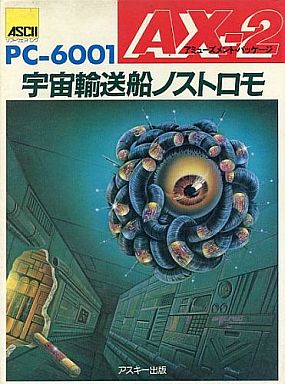
It was just enough information to reconstruct a variation in Basic. I don't know for sure, but I think the original may have been a machine language game. The following image posted along with the game screenshot looks like either a cover shot of a magazine for the PC6001 or just the box artwork of the original game. If it's a magazine then maybe its a type-in Basic program.
Notice again in the screenshot the nifty line drawing custom character set used to draw the boxes and the 4 items in the form of the 4 card suits. Also notice the fancy colours added to the regular MC6847 and the Japanese Katakana characters. In fact, I was informed on the Yahoo MC-10 group recently that it was actually a very unique variation of the MC6847 used in the PC6001 called the M5C6847P-1, which adds many advanced functions. Still, the fact that it uses the 32X16 text screen means it is relatively easy to implement a similar game just using Basic and the MC-10. Again, I don't know if the original game was machine language, but if the animated GIF is any indication, it wasn't particularly fast. There were some posts on the Yahoo group that suggested that there are various reasons that the NEC PC did not have the fastest execution speeds in either Basic or machine language. However, the game that I was able to create is fairly fast thanks to the relatively speedy version of Micro Color Basic that came with MC-10 (about 15-20% faster than stock Coco Color Basic):
If any Japanese users of the NEC PC-6001 should ever run across this blog and know about the original "Nostromo" program in more detail, I would really appreciate if they could drop me a line or make a comment on my attempt at a re-make. Whether it is an accurate representation or not, I hope it is an enjoyable game.
In my ongoing search for 8-bit BASIC game ideas and bits of code, I began looking into the classic British computer, the Acorn Atom. This machine caught my attention because it uses the same graphics chip as the TRS-80 MC-10, the MC6847 VDG. However, it predated the MC-10 by at least 3 years, coming out in 1980 or so, whereas the MC-10 came out in 1983. In searching YouTube for some videos of Atom games I ran across a couple of program playthroughs by a programmer called Dino Dini. Dini, it turns out, cut his teeth on the Atom and then went on to program some significant sports games (football/soccer) for a bunch of 8-bit systems in the late 80s. In the playthroughs, though, he is simply playing some of his original Atom games that he had thought were lost but then discovered were included with someone's Atom emulator.
What was most interesting for me about his playthroughs were the games that clearly used the obscure Semigraphics 6 mode of the MC6847.This mode is little used in Color Computer or Dragon games (which also use this chip) because the resolution it offers is only 64 by 48 pixels in 4 Colors (kinda like the graphics on a ZX81). On these machines, with their access to large amounts of memory, the high resolution modes of 128 X 192, 4 color and 256 X 192, 2 color graphics were what obviously attracted serious game programmers. And Microsoft BASIC never supported the mode. It only had commands for the 8 color Semigraphics 4 mode, which is 64 X 32, using the SET/RESET commands or the high res modes using PCLEAR/PSET/LINE/CIRCLE etc.
However, on the MC-10, which started out as a 4K ZX81-like computer, the hardware shortcuts used by Tandy to produce a small less-expensive machine resulted in a more limited set of wiring of the CPU to the MC6847 chip. This meant that graphics modes of that chip can only be memory addressed to the original 4K memory space. The results of these limitations are multiple. For example, since the highest 4 Color and 2 color modes of the VDG require 6K of memory to bitmap, when these screens are displayed on an MC-10 you only can see about two thirds of a screen before the screen "wraps around" the 4K memory space and you see the top 2K of the graphic memory repeated on the screen again. This means the highest resolutions are simply off the menu for any MC-10 programmers, including machine language coders. It is an unavoidable hardware limit. However, this didn't prevent one clever programmer using interrupts and special tricks to fool the VDG by changing modes through mid screen display, but there are still limits:
The result of all this quirky wiring is that the MC-10 is very limited in the kinds of graphics games that can be made for it. For instance it has only been able to have hires games that use the still somewhat chunky 128 X 96, 4 color mode. This hasn't prevented some clever machine language coders from producing some real classics. The most famous of these (using the term "famous" in it relative sense of renowned among the few dozens of MC-10ers on the planet) was Greg Dionne's implementation of Pac-Man. This version even received praise from one contemporary retro-gaming on-line magazine for its fidelity to the real thing:
But such wonderful games aside, there really just aren't that many graphic games for the MC-10. Being a BASIC programmer, limited only to the SET/RESET commands and the massive chunky pixels of 64 X 32, 8 color mode really gave me a craving to try to make some higher res games for the MC-10. However, there are other limits to using graphics. The way that BASIC is implemented means that some of the memory locations it uses are stored just after the end of the 512 bytes of memory used for regular screen display, so that even if you switch into higher res modes, you can't even POKE into the larger screen area without POKING into BASIC itself (the start of graphics memory cannot be changed--another limitation), which of course will bring the system crashing down.This means you have to stick to modes that only use 512 bytes of the normal screen memory, or program in machine language, and this means that from BASIC, you're pretty much stuck with using the 8 color super chunky SG4 mode.
Discovering that there was an alternative to SG4 was one of those wonderful moments I can remember of my early years in 8-bit computing. I read somewhere that POKEing into memory location 49151 would change the graphics mode. As I poked in various numbers, the different screen resolutions sprang into existence. Of course all of those above SG6 showed flickering pixels in the areas just after the text screen area, representing the changing values being stored by BASIC for various functions. However, one of these modes filled the whole ordinary screen, with no flickering. Its pixels were slightly finer than those of SG4. What was it? I figured out that I could turn the pixels on and off, but this required poking into screen mem different byte values representing different pixel combinations represented by different bit values encodes by those byte values. Eventually I was able to figure out a method for correlating specific X/Y values for the screen as a whole that needed to be poked to set the right bit in a screen memory location. Here's the routine:
This routine contains a lookup table that has to be READ into an array L(X,Y) first. If you set X and Y and GOSUB5 you can get a SG6 pixel turned on. GOSUBing 7 is used for erasing the pixel. Line 100-110 just uses these routines to draw a moving pixel to demo the routine. Line 3 is GOSUBed for turning SG6 on. Line 4 returns you to text mode (SG4). I had a new graphics mode! It was essentially equivalent to the resolution of an unmodified Timex 1000/Sinclair ZX81. One of the first useful programs that I made using these routines was a puzzle game called Monster based on the classic Theseus and the Minotaur puzzles:
As you can see, it also has some text. I created a routine for storing byte values for encoding two byte high by two byte wide characters (4X6 pixels). Still it was only a puzzle game, with limited animation of the characters (Theseus and the Minotaur). What I wanted was an arcade style game! My first attempt was to make a Missile Command like game. I eventually got one to work, but since line drawing was so slow, it really only involved moving flickering pixels. So I left the project aside for many years.
However, in the early 2000s I was able to reconnect with other MC-10 users using the wonder of the age--The Internet! I was able to find a group of people still interested in the machine on Yahoo. It was there that I came across Greg Dionne's wonderful Pac-Man. In time I asked if anyone could provide a BASIC implemented machine language routine for drawing lines in SG6. I was surprised when Greg replied with a routine to do just that:
0 SOUND1,1:CLS:CLEAR200:DIMA(90,3),K(255),I,J,X,Y,Q,R,Z,M$,F,G,A,B,C,L,E,S,V:GOTO100 9 PRINT@F,CHR$(A(Z,0))CHR$(A(Z,1));:PRINT@F+32,CHR$(A(Z,2))CHR$(A(Z,3));:RETURN 10 FORG=1TOLEN(M$):Z=ASC(MID$(M$,G,1)):GOSUB9:F=F+2:NEXT:RETURN 100 GOSUB2018 110 REM PROGRAM CONTINUES HERE
For good measure I have also included my text drawing routine. Set the string value M$ for the message. Set variable F for the starting screen location (0-511) and then GOSUB 10 to print the message. Obviously there has to be space for the length of the message. Look at line 2030-2040 for the instructions on using Greg's pixel setting and line drawing routine. It's a USR call with values I,J,Q,R. With this routine I was able to make a better version of my Missile Command:
Lately on the Yahoo group some people were talking about the graphic limits of the MC-10 and lamenting the weird wiring of the CPU and the MC6847. What prompted this were the contributions of Emerson, a user of another orphan machine, the CCE MC1000 computer from Brazil. Like the MC-10 it was a small chicklet-keyed economy computer. Like the MC-10 it used the MC6847 VDG, but it had a variation of Applesoft BASIC. And like the MC-10 it had various limitations to its wiring that prevented the full use of the VDG. Emerson told the group about his various attempts to physically mod the machine so that a fuller array of it graphic modes could be accessed. This prompted a lot of discussion of the limits in the MC-10s graphic capabilities. Another such limitation that I haven't mentioned yet is that even the SG6 mode is not fully wired so two of the 4 possible colours (in principle) are not actually available:
The first screen shows SG6 mode while the second shows the screen in regular SG4 mode. The weird green black lines represent the first 128 bytes of the character set. Only the pixel/bit combinations for byte values 128-255 are available on the MC-10. This is a result of another economy wiring decision to keep the component complexity and costs down (to be fair, the Coco ad Dragon also suffer from this limitation--only machines like the NEC PC6001 and Sanyo PHC-25 fully implemented all the features of the MC6847). Still, there are two colours available: Blue on Black and Red on Black. You can also select an alternate mode (POKE 49151,68) which gives Purple on Black and Orange on Black.
All the talk about the limits of the graphic wiring of the MC-10 got me thinking about trying to use the SG6 mode for some truly arcade style games. If I could find some good ideas and use all my latest fast BASIC programming techniques and knowledge and routines obtained from the group about SG6 over the years, maybe I could get some truly interesting effects.
It was with these thoughts in mind that I stumbled across Dini's demos of his old programs. The result is two programs DRIVE (source) and SPACEWAL (source) that attempt to recreate the games I could see being played on YouTube. DRIVE uses Greg's helpful line and pixel plotting routine. Unfortunately, that routine does not provide a way to determine if a pixel is turned on (i.e. an equivalent to the POINT function in Micro Color Basic for determining whether a pixel has been SET), so I had to figure out a quick way to determine if the moving pixel you control actually moves into any existing bit that is already turned on. Finally I figured out that all I needed to do was PEEK the BYTE location in which a pixel is going to be set using Greg's routine and then PEEK it again after the pixel has been set. If the two values are the same, then that means the pixel has been set in a location that already has a pixel turned on. This means a collision has occurred. Otherwise, not, and your "player" can keep moving. This allowed me to get the collision detection down to the level of the specific pixels on the screen that are being turned on and off and not just the level of the character bytes encoding that information. Greg didn't provide an erase function either (equivalent to the RESET command), so I just poke back the results from the peek test before the pixel was set. Here's DRIVE (a version before I had implemented pixel level detection, but its hard to notice):
SpaceWal is a neat space shooter that uses a horizontal screen orientation, instead of having the aliens descend from above. This allows for longer more complex movements of the aliens before they reach you than would be possible in the more standard vertical orientation of games like Space Invaders, etc. I pre-calculate at program startup 32 tracks that the aliens can take, which avoids a lot of checking and calculation going on in the main loop of the game. Since you shoot aliens at differing times in their approach, the randomly chosen tracks quickly "complexify" in the interactions between the two aliens that are always descending on you at any time. It also means that there is a kind of a simple AI element to the game, as once the aliens punch through an area of the wall there is a strong likelihood that they will eventually return to that area to try complete the job of flying through to the green layer and victory. You be the judge whether this trick can allow a player to predict the paths of attackers.
Random modifications to the 32 tracks occurs between games while the program waits for a new player to hit a key to play again. Since all the "sprites" in this game represent single byte characters I didn't need to use Greg Dionne's M/L routine. Instead, because of the horizontal orientation, object like the laser blast can be made simply by printing a long string of appropriate characters. Otherwise the individual sprites can be POKED into the right locations, which is slightly faster than using the PRINT@ command. You'll notice if you view Dini's video that the Acorn Atom can display SG6 graphics pixels and regular text characters at the same, so its wiring must be more complex than that of the MC-10. I used my graphics character routine in DRIVE to overcome this limitation of the MC-10 and simply shift to a separate text screen for reporting scores in SPACEWAL at the end of each game.
Anyway, so ends my retrocomputing efforts for the month of July 2015. I send greetings to all the other Retrochallengers and look forward to exploring everyone's work. I'm sure I'll find other sources of inspiration there. Thanks for another Summer Retrochallenge Mark! Sorry for the last minute entry (again).
The people of the Glenside Colour Computer Club decided to host an event celebrating the 50th anniversary of the development of BASIC. The Dartmouth Time Sharing System (DTSS) version of BASIC was the origin of the language and Kip Koon organized a programming contest to celebrate this historic beginning. He put out a call for people to try to write (fun/game) programs in Dartmouth BASIC on a DTSS Simulator. I got the simulator and began to play around with the language.
I learned a couple of surprising things. First, this earliest version of BASIC didn't originally have an INPUT command. This was because the programs were not interactive, but meant to be run on the main network hub and the result output on a teletype device. Second, the size of programs was quite limited, something less than 6 KB. Third, there was very limited string capabilities. Basically you can print literal strings, but you don't have string variables, or any string handling. So even though an INPUT command had been added to the simulator's implementation of the language, it would be hard to make a game that only used input of numbers.
My first thought was to make a version of the classic Star Trek game, since it only used numbers for input (1. Shields 2. Photon torpedoes, etc). However, the variation that I programmed ran up against the program size limit. My program was too large to fit into the DTSS. So, I moved on to thinking about other concepts. The ubiquitous "Hunt the Wumpus"-like game ideas seemed to be the only thing to be practical (small memory, number input). It was very challenging to think up anything entirely new.
I have enjoyed recently watching some of the episodes of "Tabletop" with Will Wheaton. He's of a similar age to me and a similar degree of geekyness. I grew up playing combat simulation board games like Blitzkrieg, and so the thought occurred to me of trying to create a simple board game simulation for the DTSS BASIC game contest. I had run across the Epyx game, "Crush Crumble Chomp" back when I was doing my port of "Temple of Apshai" to the MC-10. I knew it was a variation of a classic Board game, so I went and looked it up. The game was called "The Creature that Ate Sheboygan."
The game was originally designed by the brilliant board game designer Greg Costikyan. Although the project grew to such a size, far beyond the 6KB limit of DTSS, and for reasons of wanting to add some nifty graphics to represent the various different monsters (in purple below), or Kaiju as the Japanese call them, I decided to switch back to working on it in Micro Color BASIC. Still, with enough space, I think the resulting game could in principle be done completely in Dartmouth BASIC. In essence it only uses simple keystrokes and numbered directions for input. The main action takes place on a 16 X 16 grid, using only simple characters to represent the elements making up a map of the City of Sheboygan. Other than that, the game is all about combat tables and game rules and applying the results of simulated dice throws to the tables and rules.
Anyway, after a week of putting a push on in hopes of having it ready by the weekend of the Annual "Last" Coco Fest, I have produced a variation of the game that I believe faithfully captures all the elements of the original with only a few compromises to help the AI that I was able to implement to play the "human" side of the game.
The game and the VMC10.exe MC-10 Emulator to play it can be downloaded here or on the Javascript MC-10 Emulator. Just load the SHEBOYGN.C10 file after typing in CLOAD and hitting ENTER. Then type RUN and hit enter.
Coco Version of SHEBOYGN.BAS
A link to the Coco specific version can be found in my coco compilation zip on the JGGAMES10.DSK
You can press the "H" key during the *MONSTER MOVE* phase to receive some help about playing the game.
During your turn as the monster (M), when the other pieces (see right pic above) are stationary, you can choose (ASWZ) to move or (D) destroy stuff, (F) breath fire, (X) make a web, (C) scream sonically or hit (SPACE) to do nothing. You get a number of moves based on your abilities and your strength. At the end of your turn you can attack nearby enemy units by choosing a direction number or hit 0 to refrain from attacking. When you are prompted for a numeric value you can hit space to scroll through the range of options before hitting (ENTER) to initiate the action. Basically you want to destroy as much as possible to get to a certain level of destruction (based on your level of difficulty). You must defend yourself against the aggressive units and "eat" the civilians. All attacking units have certain ranges and certain movement characteristics.Troops, for instance can travel through/in buildings. Units within their relevant ranges wil pool their attacks on you each round. If you lose enough power and strength, you can be defeated by the measly humans.