Tuesday, 19 September 2023

"Third World War" by Free Game Blot (1985)

This game is a conversion of a BASIC program made by "Free Game Blot" for the Matra Alice to its cousin system, the TRS-80 MC-10.  The game is called "World War 3" in its docs, but "Third World War" on the game title screen. The original program used high resolution graphic images to represent tanks and artillery units, although the artillery symbols really look more like infantry rifles, which leads me to think that the documentation and programming teams were quite separate entities at Free Game Blot. I have replaced the high res symbols in my version with low res graphic characters. I used an L-shaped block character for tanks, and diagonal line block character for artillery units.The flag graphics from the intro screen have also been re-rendered using low res semigraphic-4 character graphics.

Fancy hires unit display of Alice version

The game is a kind of combination of Risk and Battleship. Like Risk, you must maneuver military units on a map, combine and split units, and engage in combat with enemy units to conquer spaces on the map. Like Battleship, the map takes the form of a grid and you cannot see the enemy units.  Instead you must rely on the limited reports of scouts and captured soldiers, who can tell you about specific spaces.  Also unique to the game, units can have different levels of morale, which influences their effectiveness

In addition to the graphics, the computer uses musical refrains to indicate which of the sides is victorious.  Since the Alice shares with the MC-10 only the simple Microsoft BASIC SOUND command it was not very difficult to translate those refrains.  However, the Alice uses a much more feature-rich but complex Thomson graphics chip that also allows 40X24 and 80X24 text screens. Many machine language subroutines had to be used to allow these graphics to be displayed on the Alice.  After much trial and error I was able to strip out these routines and replace them with a simpler set of PRINT@ commands using low res block graphics of the MC-10's 32X16 text screen (and the Alice, when it is in 32X16 "MC-10 mode").

To figure out the conversion process I had to translate (with the help of Google) the instruction sheet from French (The Alice was an early French 8-bit home computer developed from the Tandy MC-10). Here are those instructions (with some added notes by me in red):


WORLD WAR THREE 

By Free Gameblot

Au debut de chaque bataile, vouse et votre ennemi (l'ordinateur) disposez de 18 unités chacun. Vospositions, artillerie et chars sont dessinees sure un échiquier de 45 cases reérees verticament de A a E et horizontalment de 1 a 9. Seuls vost poistions sont visible a l'ecran, celles de l'ennemi demeurent invibles. Le but de jeu consiste a aneantir toutes less armées adveses en ayant le minimum de perts possible.


1) Description des unités: 1. l'artilerie, reprsentée par les fusils; 2. les blindés, par chars.  Moral des troupes: a chaque unité est associé un niveau de moral: N: moral normal; F: moral fort. Le moral des troupes est déterminant dans un combat. Par example, deux artilleries avec un moral fort ont beaucoup de chance de remporter un compat face à une unité de blindés au moral normal. Le moral de vos unités est variable en fonction des combats livrés. Si une troup au moral normal remporte une bataille, son moral devient automatiquement fort. Inversement, si une troupe au moral fort perd une bataile, son moral devient normal.

Les combats se font avec les déplacements de vos unités. Il n'est donc possible de déplacer au maximum que le nombre d'unités inqiqué sur une position de l'échiquier.


2) Déplacement des troupes.

Les positions sont repérpées horizontaiement et verticalement. Il est donc possible de déplacer ses unités latéeralement, verticaiment ou en diagonale, mais toujours à partir d'une case contigue.

Pour déplacer les unités, indiquez d'abord la position d'origine (lettre puis chiffre), puis la position finale (lettre puis chiffre).

Enfin, indiquez par un chiffre 1 de à 4 le nombre d'unités à déplacer.

Ce nombre doit être inférieur ou égal au nombre d'unités indiqué sur la position concernée.

Il est possible de regrouper vos unités sur une même position, mais à condition de ne jamais dépasser 4 unités par case.

Les regroupements de troupes ne peuvent se faire qu'avec des troupes de même arme, c'est-à-dire artillerie avec artillerie ou blindés.

Les regroupements avec des unités au moral différent (F et N) entrainent automatiquement des unités au moral normal (N).


3) Les Eclaireurs.

Avant chaque déplacement, vous devez envoyer un éclaireur sur l'échiquier pur essay de repérer les positions ennemies. Il est prudent d'envoyer l'éclaireur à proximté de vos positions pur déjourer toute tentative ennemie. Ses indications sont précieuses: 

- Nothing to report: Rien à signaier, pas d'unité ennemie sur la case désignée.

- Champs de mine: tout déplacement sur cette case entrainera une destruction de votre unité déplacée.

- Une position ennemie, l'enemi a des troupes sure cette case, l'éclaireur vous indque alors le nombre d'unités, le type de l'armée (artillerie ou blindés), et le moral des troupes.

- Un prisonnier a parlé: vous avez capturé un prisonnier qui vous révele less positions de l'ennemi, mais sans doner de quantité.


4) Les coups de main et les accrochages.

Les coups de mainadverses peuvent survenir à tout moment et se soldent par des gains si des perts d'unités pour vous et votre adversaire.

Si vous restez maitre du terrain, vous conservez la position acquise. Si l'ennemi gagne cette bataille, vos troupes disparaissent de la case et celles de l'ennemi prenent leur place sur l'échiquier.

Si vos unités remportent une bataille, leur moral se renforce. Dans le case contraire, il devient (ou il resté) normal.


5) Fin du Jeu.

La guerre se poursuit jusqu'à la destruction totale de vos unités ou de celles de votre ennemi.

A vous de déplacer judicieusment vos troupes au bon moment pour détruire le maximum d'unités ennemies. Mais attention aux contre-attaques de votre adversaire... Bon Courage!


ENGLISH INSTRUCTIONS

At the start of each game, you and your enemy (the computer) have 18 units each. Your positions, artillery and tanks are drawn on a board of 45 squares labelled vertically from A to E and horizontally from 1 to 9. Only your positions are visible on the screen, those of the enemy remain invisible. The goal of the game is to annihilate all the opposing armies with the minimum possible losses.


1) Description of units:

1. artillery, represented by an upper angled graphic piece;

2. armored vehicles, represented by lower angled (L-shaped) graphic piece.

Troop morale: each unit is associated with a morale level: N: normal morale; S: strong morale. The morale of the troops is decisive in a fight. For example, two artillery units with strong morale have a good chance of winning a match against an armor unit with normal morale. The morale of your units varies depending on the battles fought. If a troop with normal morale wins a battle, its morale automatically becomes strong. Conversely, if a troop with strong morale loses a battle, its morale becomes normal. (Note: This instruction is confusing as all battles are resolved with one side or the other being annihilated in the particular square of the grid. In other words, there is no possibility for units to "become normal" again after "losing.")

Combat takes place with the movements of your units. It is therefore only possible to move a maximum of the number of units indicated on a position on the board.


2) Troop movement.

The positions are marked horizontally and vertically. It is therefore possible to move your units laterally, vertically or diagonally, but always from a contiguous square.

To move the units, first indicate the original position (letter then number), then the final position (letter then number).

Finally, indicate with a number from 1 to 4 the number of units to move.

This number must be less than or equal to the number of units indicated on the position concerned.

It is possible to group your units in the same position, but on condition that you never exceed 4 units per square (Note: My son and I noticed in examining the code and playing the game that this limit doesn't appear to apply to the computer.  We both have seen groupings of 5 artillery-- a case of do as I say, not as I do?  Perhaps it is a accommodation to help compensate for the computer's weak AI?)

Troop groupings can only be done with troops of the same weapon, that is to say artillery with artillery or armored vehicles with armored vehicles.

Groupings with units with different morale (S and N) automatically result in units with normal morale (N). (Note: I have found that the game allows strong morale units to join with normal morale units with the high morale preserved, but if normal morale units join with strong morale units, the morale returns to normal-- I am not sure if this is a bug or a feature)


3) The Scouts.

Before each move, you must send a scout onto the board to try to locate enemy positions. It is prudent to send the scout near your positions to thwart any enemy attempts. His indications are vital:

- Nothing to report: Nothing to report, no enemy unit on the designated square.

- Mine fields: any movement on this square will result in the destruction of your moved unit.

- An enemy position, the enemy has troops on this square, the scout then tells you the number of units, the type of army (artillery or armored vehicles), and the morale of the troops.

- A prisoner has spoken: you have captured a prisoner who reveals the enemy's positions to you, but without giving any quantity.


4) Hard strikes and skirmishes.

Main attacks can occur at any time and result in unit gains or unit losses for you and your opponent.

If you remain in control of the terrain, you retain the position acquired. If the enemy wins this battle, your troops disappear from the square and those of the enemy take their place on the board.

If your units win a battle, their morale increases. Otherwise, it becomes (or remains) normal.


5) End of the Game.

The war continues until the total destruction of your units or those of your enemy.

It's up to you to carefully move your troops at the right time to destroy as many enemy units as possible. But watch out for your opponent's counterattacks...

Courage!


ADDENDUM:

I think I found a bug in the code. A couple actually, although the first isn't really a bug as such, but perhaps more a calibration and game testing issue. I found the game impossibly/unfairly hard to win on levels 2 and 3. I thought this was just me being a crappy player, but having played quite a bit now and figured out some simple strategies (basically seeking local preponderance of force wherever and whenever possible, otherwise avoid combat), I realized the AI was just unfairly advantaged at level 2 and 3. The raw level numbers were used to weight the formula for determining the outcomes of battles and also in a latter check about who won (there's some "compounding weighting," as my son Charlie put it, going on). But on level 2 and 3 the scale is tipped way too far in favour of the computer AI. I found that 1, 1.3 and 1.6 worked better as a scale factor. On level 1 it  can be won by novices, 2 is a tough slog, and I haven't won 3 yet, although I think I came close once.  Charlie recommended getting rid of the double weighting, but I felt my re-scaling changed the game the least from the original, which is more in keeping with my preservationist goals, so I'm  sticking with it (for the time being).  Here's the edit:

350 A$="CHOOSE LEVEL (1,2 OR 3)?":JJ=7:II=4:FA=0:NM=128:GOSUB30000:A(0,0)=3:GOSUB9500
355 IFN<1ORN>3THEN360
356 NV=1:IFN=2THENNV=1.3
357 IFN=3THENNV=1.6
358 GOTO420

We also noticed that there is a compounding element to the combat formula involving a turn counter that slowly makes it more difficult to defeat the computer as the game goes on. This seems to be a way of encouraging making bold strikes at the beginning of the game, and discouraging simply meticulously avoiding combat until you can build a local preponderance of force.

The real bug in the code resulted in enemy units disappearing from the board. Random numbers for possible next move coordinates were generated, but the routine used a division by 2 operation that would sometimes result in .5 on some coordinate numbers. These would just get INTed out when used in checking the board array.  However, in some checks done to throw out coordinates, such as the one comparing the current coordinates with the newly generated ones to make sure they were not simply the same, they would sometimes not be discerned as being the same because some new coordinates would have a decimal number in them. This would allow a move to the very same location and then erase the old location (which was that same location) essentially wiping the units from the board. So I simply added INTs to the new random coordinate generator lines of the subroutine.  Here is the new code:

REM RANDOMLY MOVE ENEMIES
2100 S1=INT(S+(RND(8)-3)/2)
2110 IFS1<1ORS1>5THEN2100
2120 T1=INT(T+(RND(8)-3)/2)
2130 IFT1<1ORT1>9THEN2120
2140 IFS=S1ANDT=T1THEN1072
2150 IFTD(S1,T1)<>TD(S,T)ANDTD(S1,T1)<>0THEN1072
2160 D(S1,T1)=D(S1,T1)+D(S,T)
2170 TD(S1,T1)=TD(S,T):D(S,T)=0
2180 TD(S,T)=0:XD(S,T)=0:GOTO1072

I also fixed an improperly exited set of  FOR/NEXT loops, as this always worries me as possibly causing problems. And an unRETURNed GOSUB after you win.  The game would restart by jumping to the start of the main part of the program. I made it reRUN that line number instead so all variables and unreturned GOSUBs would be reinitialized.  Otherwise, if you played enough you might blow the lid off the RETURN stack.

I'll keep testing a little more to ensure that my fixes have worked and there aren't other bugs. On the whole, I'm a little underwhelmed with Game Blot's quality control and game testing performance. It seems this game had most of its effort poured into its fancy graphic interface, rather than the game itself.  Which is sad, because it's a simple but fun little text game when it works, even if its AI is, as Charlie puts it, a wee bit "stochastic parrot," whatever that means.

Friday, 4 August 2023

"Fox and Geese" by Input Magazine (1984)

I came across a very interesting article in "Input Magazine" with a simple AI BASIC program. "Input" was an early 1980s computer publication by Marshall Cavendish.  It was dedicated to teaching the basics of computer programming. Every issue included both BASIC and machine language programs with detailed explanations of the listings. The magazine also included very engaging artwork in the form of playful cartoon characters and scenes illustrating aspects of the programs.

In order to illustrate simple AI techniques like the Alpha-Beta algorithm the authors of the magazine chose a simple board game to automate (rather than a complex game like chess) called "Fox and Geese."  In his comment on my Youtube video about the game @me_fault provided a nice little synopsis of the game:

Only the green squares are used. The four Geese on the green squares at one edge; the fox on a green on the opposite edge. The objective of the Fox is to cross from one side of the board to the other; the Geese's objective is to prevent it from doing so. The fox is trapped when it can no longer move to a vacant square. 

The Geese move diagonally forward one square (only one goose per turn); the fox diagonally forward or backward any number of greens. There is no jumping, occupying the same green, taxes or removal of animals.

Here is a graphic of the game to illustrate the elements of @me_fault's description:


The geese are the yellow objects at the bottom, the fox is the red object in the top half of the board. 

As was normal for "Input" magazine, listings were provided for Commodore 64, Sinclair Spectrum, Coco/Dragon 32 and Acorn Electron. The Coco version illustrated the game board (standard 8X8 chess board) using hires graphics. The scan of the magazine was very good, so the text capture required (relatively speaking) much less editing to get it into an operating condition. The latest version of the VCC Coco emulator includes a feature to paste text directly into the emulator and BASIC.  Unfortunately, it randomly drops lines during the pasting process, so I had to go back to my utilities that transfer Windows .txt files to virtual disks to get a clean transfer.  Once that initial task was done, I could use the paste function to input lines fixed in the Windows file into the emulator.

I had a hard time getting the program running because there were some errors in the magazine listing.  The most vexing was a missing minus sign in the following line:

2026 BX=B(31)*2-B(24):E=1E30:H=1E30

Which should have read

2026 BX=B(31)*2-B(24):E=1E30:H=-1E30

I only spotted this one because I gave up on getting the program running and had started working on the Commodore 64 source code to try to convert it to an MC-10 version using lowres graphics. Since I had combed through the Coco code so many times looking for transcription errors, when I saw the minus sign on the H variable I remembered that the Coco code lacked that.  I think I noticed this because it seemed odd to assign two variables (probably constants) with the exact same value. So when I saw the  C64 code with two values that were different, it triggered a recognition.  When I fixed this, the Coco version finally worked.

Another problem I ran across involved some DEFN mathematical functions (there are a bunch). The program kept throwing errors when two of these functions were called.  It turned out that this was because there were some extra brackets in one of the formulas and a misplaced asterisk in another:

2140 DEFFNX(B)=(B=G(1) OR (B=G(2)OR (B=G(3) OR B=G(4))

This should have read:

2140 DEFFNX(B)=(B=G(1)ORB=G(2)ORB=G(3)ORB=G(4))

And:

2150 DEFFNXX(B)=-((7ANDB) <4 * )(28 + 40*(3ANDB))-((7ANDB) > 3)*(128-40*(3ANDB))

which should have read:

2150 DEFFNW(B)=-((7ANDB)<4)*(28+40*(3ANDB))-((7ANDB)>3)*(128-40*(3ANDB))

It's difficult to understand how these errors could have crept into the listing. They are quite catastrophic. I fixed the DEFfunction errors first, because they could be spotted just in terms of bad BASIC syntax. After I had fixed those the program would run, as long as the player only chose level 0 for the computer opponent for the geese or fox.  So the best I can imagine is that the Coco conversion was  based on one of the other versions and that perhaps the programmer only tested human player versus human player function.  Or perhaps the Dragon is somehow more tolerant of bracketing in its implementation of Color BASIC.

Another problem I ran into was that there are places where Color BASIC (on the Coco, not the MC-10) absolutely needs spaces in front of  certain commands for the parser to recognize those commands, which is a problem if they are preceded by an purely alpha variable name.  Otherwise, the parser can't spot the command (i.e. differentiate it from the alpha variable). This is the case for

AND
OR
THEN
TO (in an FOR/NEXT loop construct)

For example the following packed lines will not work

IFA=BTHEN
FORA=BTOC
IFA=BANDC=DTHEN

These need to be re-written as:

IFA=B  THEN
FORA=B  TOC
IFA=B  ANDC=D  THEN

Since the magazine used proportional spacing, some spaces were not always evident (to either a reader or the OCR software). So all such instances had to have spaces added.  At the same time I was able to eliminate unneeded spaces, which should help speed up program execution.

Another problem that I ran into was that the emulator kept running out of memory (OM ERROR).  I've run into this before, most commonly because a program assumes a tape based system.  When a Coco disk cartridge is added some memory is reserved for disk activities.  So programs made for a purely tape-based systems have slightly more space to work with.  This seemed to be the case here.  I was able to try to condense the program in various ways such as shortening messages and removing redundant code, such as consolidating multiple identical win messages into a single subroutine.

Finally, a graphic message is flashed when a player makes wrong moves or provides improper input.  In the original program this involved flashing a simple red box with a buzzer sound. The box was unclear (to me at least) in terms of the message it was meant to convey.  I chose to replace it with a simple flashing X with buzzer, which seemed clearer to me as an indicator of illegal input.  So I replaced:

5000 FORK=1TO14:PUT(200,5)-(210,15),SQ,PRESET:PLAY"T50AC":PUT(200,5)-(210,15),SQ,PSET:PLAY"DA":NEXT:RETURN

with the slightly longer (I felt it was worth the memory):

5000 FORK=1TO14:LINE(200,5)-(210,15),PSET:LINE(210,5)-(200,15),PSET:PLAY"T50AC":LINE(200,5)-(210,15),PRESET:LINE(210,5)-(200,15),PRESET:PLAY"DA":NEXT:RETURN

The source code can be found here:

https://github.com/jggames/trs80mc10/tree/master/quicktype/Artificial%20Intelligence/FoxGeese

The directory is in my MC-10 repository because, as I mentioned, I was going to try to make an MC-10 lowres conversion.  I might still try that.  But in the meantime the Coco version of the game can be played here:

https://archive.org/details/@james_gerrie

Feedback welcome.

Thursday, 4 May 2023

"Space Mouse" by Takanari Suzuki (1981)


According to the Giant Bomb game website "Space Mouse" was created in 1984 as a "type-in" program in the Japanese computer magazine I/O.  The following blurb from Giant Bomb regards a modern 2016 re-make of the game in celebration of its 25 Anniversary:

Space Mouse: 35th Anniversary Edition is a deliberately-retro vertical-scrolling sci-fi maze game developed and published digitally by Mindware for the PC on November 8, 2016.

The sixth game in the studio's "Video Game Classics" series, Space Mouse is a remake of the NEC PC-8001 game of the same name, which was originally created by Takanari Suzuki as a "type-in game" for the September 1981 (Vol. 6, No. 9) issue of the Japanese microcomputer magazine I/O.

In the game, players must guide Alice up each floor of a tall building to its roof while avoiding being caught by space vermin. She is under a time limit (with a limited air supply), but can make use of power-ups to smash through walls and ceilings.

This version features numerous enhancements from the original, including smoother gameplay, additional levels, a key/door system, chiptune audio, and redrawn 8-bit pixel art. Additionally, players can play a port of the original PC-8001 version and an alternate arrangement (based on the Sharp MZ-700 series of computers).

If I recall correctly, I made my variation of the game in BASIC back in 2016 too, inspired by some online images I had seen of a version for the NEC PC6001. I somehow (perhaps asking my son to translate some Japanese description) came to the conclusion that the game was by a fellow named "Seiji" from 1983.  Perhaps this was simply a NEC PC6001 remake of this "classic" of the Japanese home computing era.  But it is hard to confirm the facts of the original game, including the author's name.  The site strategy wiki mentions that the author also went by the name "Geimu Kyoujin."  But I can't locate the source in the magazine proposed by Giant Bomb to confirm whether it was a BASIC program or some kind of machine language listing.

The date provided in the quote doesn't seem to point to a scan of I/O with an obvious listing of Space Mouse.  I even asked my son Charlie, who knows the Japanese alphabet systems, and can use Google translate to do searches, to look for it.  Here's the link for where I think the volume can be found on the Internet Archive:

https://archive.org/details/IO198109/mode/2up

It states in the top corner of the front page that it is Vol. 6, No. 9. for 1981. But I can't find any article in it that would seem to be for Space Mouse.  And my son did a search for the Japanese for "space" and "mouse" and only came up for the word "space" in a few adds for space-themed games. 

The Youtuber Highretrogamelord provides a playthrough of a NEC PC-88 version of the game:

https://youtu.be/7FR0IZuZEoc

In his description he states that it:

Also came out for: PC-6001 mkII and PC-8000.

Game description:

Space Mouse is a vertical-scrolling maze game. The player controls a cat who is travelling up through an infinite maze. The player gains points as they travel, and the goal is to travel as far as possible. Space mice travel down throughout the level, blocking the player's progress; the player must dodge the mice, and loses a life if they come in contact [with] them. The mice have simple movement patterns but move quickly, and there are often several on-screen at a time.

Space Mouse was released as a type-in BASIC game in a 1981 magazine, and was later included in other type-in software books. A port was bundled with a number of enhanced remakes as a part of Space Mouse 35th Anniversary Edition for Windows in 2016.

He suggests that the original game was in BASIC, but as I said, I have not been able to confirm that. I think his reference to PC-8000 is probably for the original PC-8001 mentioned in the Giant Bomb quote.  There seem to be a lot of versions of the game out there, including one for the FM-7 home computer. On the P6ers web site (retro users of the NEC PC6001) there are multiple entries. It suggests that the program has been made available by the author.  I think this refers to the PC-6001 version that might have been the inspiration for the version I made back in 2016, but I can't seem to find any video playthroughs for the PC6001 version now.

This site mentions that the game was very popular:

http://tiny-p.cocolog-nifty.com/log/2013/07/7-c58f.html

This is a link to a 40th anniversary celebration conference for the PC-8001. In addition to mentioning that Space Mouse was one of the systems most popular games it also mentions Heiankyo Alien.  Both are included built for a modern mini-emulator version of the PC8001.  Although the game was popular, today this popularity mostly extends to later variations of the game.  Once again, we might have an example of a "classic" game that had its beginnings as a humble type-in, maybe even a BASIC type-in, but for which the majority of the historical recollection focusses on the professionally published commercial versions and not the type-in that inspired the entire family of games.

My Recent Update of the Game

I have been editing my version to improve it.  I have added key sensing using the PEEKS provided to me by Greg Dionne.  They give better response, don't get "stuck" and allow multiple key presses to register, so you can use diagonal directions. I have also added the feature of Power Boosts that move you upwards at a fast rate, including smashing through floors. However, I have made some changes to the backstory.  The Japanese call the game "Space Mouse" but it should probably be "Space Mice" because in the original the antagonists are mice moving downward as you try to move upward.  You are supposed to be a cat climbing a tower/"building."  When you reach the top, you enter a rocket ship and blast off becoming the first cat in space.  I suppose the fast moving downward objects are kind of like scurrying mice, but in my version I chose to change the premise. This is mostly because I am using orange blocks for the energy objects that you need to collect as you climb.  For technical reasons I want to use orange blocks (they're at the end of the ASCII character list of the MC-10).  Orange reminds me of cheese, so I think of the player as a mouse scurrying to the top of the tower chasing a trail of cheese left by workers.  Meanwhile, Taby cats living in the tower are trying to thwart your assent.  The small orange pieces renew your energy and allow you to continue to ascend.  When you have a run-in with a cat, you lose energy.  You need one energy unit for each new stage, so don't let if fall too low.  If you collect the large orange block, you will shoot to the top of the stage, so don't select it if it makes more sense to simply eat more ordinary cheese blocks on that level.


Use WASD to move.

Friday, 31 March 2023

"Cribbage" in Microsoft BASIC by Sheppard Yarrow (1979)


I was working on trying to port to Micro Color BASIC "Cribbage" in Microsoft BASIC. The program was ported to MS BASIC by Steven Williams from Sheppard Yarrow's original source from Creative Computing (May 1979) and then published in David Ahl' Big Computer Games book (1984). I can't play Cribbage, but my volunteer tester, George Phillips from over on the MC-10 Facebook group, told me it couldn't score runs properly. So I combed the code for typos, compared the original Creative Computing listing and the MS version.  The only major typo I could find was in line 560 which read:

540 C(1,J)=M(I1,J)
550 C(2,J)=M(I2,J)
560 C(3,J)=M(I3,J)
570 C(4,J)=Y(I4,J)

It should have read:

540 C(1,J)=M(I1,J)
550 C(2,J)=M(I2,J)
560 C(3,J)=Y(I3,J)
570 C(4,J)=Y(I4,J)

The first 2 cards are the computer's discards being assigned to C() from M() done at lines 540 and 550 and the second 2 discards from you are done at line 560 and 570.  These make up the "crib" and George reported that the crib was messed up.  So, I looked and noticed the asymmetric distribution between the M()s and Y()s being assigned to C().  

But besides that typo and a multitude of improperly closed FOR/NEXT loops (which I fixed) I couldn't seem to get the runs search subroutines to work.

So I began digging deep into these subroutines by creating a test-bed routine for just the 3 run subroutine and discovered it was definitely not working. The program has to figure out complex runs like 4,3,2,2,2, which give you 3 separate 3 runs, and the like. Yarrow obviously felt he had an algorithm that worked, but I couldn't get the 3 run subroutine to recognize even a simple run fed to it directly in my test-bed. How could a game published in Creative Computing, and then David Ahl's Big Computer Games in BASIC (conceivably another million seller) be so broken?  How could all 3 subroutines break at once?

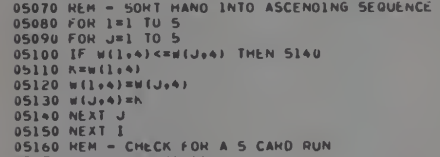
Well I think I finally cracked it. The sorting before doing the run check subroutines (5,4 or 3), says in the REM comments that it orders in ascending sequence, but it actually does descending. When I turn my test sequences around, the subroutine worked!!!!!!!

George was also doing some looking at the code.  As he commented,
Yeah, you'd think that if it had a flaw it would be a subtle one. I took a look at the original code. It looks like it is kinda doing the right thing. Sorting the cards and then looking for a sequence of increasing values. That should find simple runs though it is far from obvious that it handles double runs and the like.
I'd come to the same generals sense of the subroutines. But when I looked at the sorting routine I began to wonder if it really was ordering the list of cards (by values 13-1) in an ascending way.  From test input, and the output of the test-bed it looked like the cards were actually going into the subroutine in a descending sequence.  You can try it out yourself.

Here's my test-bed routine for the 3 run search subroutine:

10 CLS:S(1)=1:S(2)=2:S(3)=3:S(4)=3:REM** THESE ARE READ FROM DATA IN THE ORIGINAL ONLY ONCE
20 REM** INPUT CARDS
5375 FORC1=1TO5:PRINT"CARD"C1;:INPUTM$:W(C1,4)=VAL(M$):NEXT
5380 FORC1=1TO5:PRINTW(C1,4);:NEXT:PRINT:PRINT:REM** PRINT CARD SEQUENCE
5400 GOSUB5700
5410 PRINT"END":END
5700 REM** CHECK FOR A 3 CARD RUN
5710 FORL=1TO3
5720 D=W(L,4)-S(1)
5730 FORI=1TO3
5740 S(I)=S(I)+D
5750 NEXTI
5760 FORI=1TO3
5770 PRINTW(L+I-1,4),S(I):IFW(L+I-1,4)<>S(I)THEN5820
5780 NEXTI
5790 REM** A 3 CARD RUN
5800 P=P+S(4):REM** INCREMENT SCORE
5810 PRINT"RUN FOUND":RETURN
5820 NEXTL
5830 PRINT"NO RUN FOUND":RETURN
Here's the original sorting routine:
5280 REM** SORT HAND INTO ASCENDING
5290 REM  SEQUENCE
5300 FORI=1TO5
5310 FORJ=1TO5
5320 IFW(I,4)<=W(J,4)THEN5360
5330 K=W(I,4)
5340 W(I,4)=W(J,4)
5350 W(J,4)=K
5360 NEXTJ
5370 NEXTI
But if I reversed the sorting (at least by my updated test-bed routine above) it worked!
5280 REM** SORT HAND INTO ASCENDING
5290 REM  SEQUENCE
5300 FORI=1TO5
5310 FORJ=1TO5
5320 IFW(I,4)>=W(J,4)THEN5360
5330 K=W(I,4)
5340 W(I,4)=W(J,4)
5350 W(J,4)=K
5360 NEXTJ
5370 NEXTI
Try an card order like 2,2,3,4,12 or 2,10,11,12,12

I'll let you folks know with an addendum here whether the reversal fixes all of the search routines and whether it is actually able to find double runs and the like.

If folks want to help, the current "fixed" version can be tried here using an online MC-10 Emulator:

https://archive.org/details/@james_gerrie

I also, on the recommendation of  George, added in some "Press ENTER to continue" prompts and the ability to type "Y" at most prompts to have your cards re-displayed.  And I altered most PRINT statements to use my 32 character screen width word wrap routine.


ADDENDUM

George told me that it seems to recognize runs now.  Including double runs. Here's one hand he said it scored correctly:


Hopefully, we've got all the major bugs out now....

Nope, Spoke too soon.  Looked through subsequent issues of Creative Computing and found a correction by Yarrow in Aug 1979 issue:


I implemented it for the Microsoft version as follows:
2710 IFC<>1THEN2840
2705 IFM5<>1THEN2840:REM CORRECTION CC AUG 1979
2720 FORJ9=1TO4

I also found this discussion in the Oct 1979 volume:

CRIBBAGE Debugged 

Dear Editor: 

Several readers have contacted me concerning my 
CRIBBAGE program (May 1979) and brought to light three 
problems. The first is a real bug: the computer will on occa¬ 
sion after a “GO” situation, replay a card it has already 
played. The correction involves the addition of a line of code 
as follows: 

2605 IF M5 <>1 THEN 2730 

The second problem is an irrelevant bug in that line 2710 
should be 19=VC(B9,1). The lijie as currently written causes 
no problem, and may be entirely eliminated. This section of 
code is only used when the computer’s hand consists of four 
5’s. The correction will cause the computer to play the first 5 
in its hand; leaving the line as is or removing it causes the 
computer to play the fourth 5 in its hand. 

The third problem turns out to be a bug which will appear 
or not appear depending on how a particular BASIC language 
processes FOR/NEXT loops. Consider the following 
instructions: 

3210 FORK=lTOI 
3220 FOR L=K+1 TO I 
...
3270 NEXTL 
3280 NEXTK 

IBM BASIC evaluates the limit of the FOR/NEXT loop 
before processing the loop; therefore, when K reaches the 
value of I the FOR/NEXT loop on L will not be executed 
because I + 1 is greater than I to start. On the TRS-80 
however, BASIC evaluates the limit of the FOR/NEXT loop 
at the end of the loop and therefore will execute the loop with 
L equal to 1+1 which causes all sorts of problems during the 
play of the hand. To eliminate this "bug" (?) change line 3220 
to read FOR L=K TO I. 

I couldn't find any mention of the correction of the problem with the sort routine I discuss above.  Which is weird.  But I did notice a reference to the game on a database of video games site: https://videogamegeek.com/videogame/247086/cribbage-1979

No one has rated the game on that site, which makes me wonder whether its "brokenness" meant that people were excited by the game, but ultimately disappointed by its performance and few ever really played it.  However, that speculation is frustrated somewhat by another reference I found in Czech computer magazine from back in the day:


A little Google translate done on the article reveals that the bulk of it is simply explaining the rules of the Cribbage to a non-English speaking audience who are unfamiliar with the game.  However, there is a small discussion at the end of the Microsoft version:
-------------------------------------------------- -------
*** PC version specifics ***
-------------------------------------------------- --------
At the "Remove" prompt, enter a number between 1 and 52 in this space
will remove the package for the cards. The cards in your hand are in the game
numbered 1 - 6, for inputs use the numbers, not in card values. If you are forced to say "GO" write "go" or "GO" instead of numbers and cards.
The computer shuffles and deals the cards, generates a reversed card,
keep track of the score and correctness of the points obtained during the game. He won't let
you go past 31, but he does not check if you have a card that
you could play If you miscalculate the value in your hand or
in the game, you don't have to doubt that the computer calls out mercilessly
"MUGGINS".
The program uses a relatively simple strategy consisting of
the cards whose point total has the highest value are also held.
There are many more sophisticated strategies that you can play with
introduced in a book about card games. Here, however, there is too much
it didn't work out.
Nice game
TOPSOFT
Kralupy nad Vltava
1987
==============================

Mr. Vltava says "Nice Game" at the end of his review. So obviously there must have been a working version out there that didn't suffer from the catastrophic error of the reversed sorting routine.  But I can't find mention of a correction of this anywhere. But I can't see how the source as printed could do anything except reverse the order.  It's not a typo by me.  Here's the original article.

It kind of makes me question reality.  Maybe my MC-10 and its Micro Color BASIC are part of some parallel universe, in which sort routines work backwards?!  If anyone could shed light on this matter, I would really appreciate it if they could leave a comment and put my mind at ease.

Sunday, 19 March 2023

"Mission Adventure" by Michel Brassinne (1984)

The author of the Retroprogammez blog made a nice post about this game. It is an example program from a fairly regular contributor to the French computer magazine Jeux & Stratégie. Garry over on the CASA Adventure forums noted that in terms of items in the CASA database:

The only games I'm aware of from Jeux & Stratégie are 'Nordal le Magicien' and 'La Route de Samarcande'. Both are role-playing games for the Amstrad CPC written by Michel Brassinne.

Garry wasn't sure whether Mission Adventure would be worth translating to English (it might be an RPG given its pedigree). He also pointed out that the source I was working with from Retrprogrammez had been modified by a number of individuals.

1 REM ====MISSION AVENTURE====
2 REM Auteur : MICHEL BRASSINNE
3 REM Jeux & Strategie numero 29 - pages 44-48
4 REM Reprise : DOMINIQUE RIOUAL
5 REM Version : 1.0 du 17/12/2017 6 REM 1.1 : 16/09/2022 - Corrections avec VSC

I can confirm that it is definitely a text adventure, but it is not going to be a historically pristine representation of the original listing. It's unclear what if any "corrections" were made by Rioual or drawn from the follow-up article in VSC (See below). Taking a look at the scan of the original code I couldn't notice anything obvious. But I found that the code still seems to have some bugs, or oddities that perhaps I simply couldn't figure out correctly. There are some uncompleted or redundant (non-operative) lines and a number of other issues.

There is a "candle" listed among the items/objects in the program, but I couldn't find any aspect of the code that would seem to allow a player to find that item.  That being said, I did find a reference to an unmentioned single word command.  If you typed "LUX" at the "Action" prompt the variable for turning on light in the cave areas would be switched on and the French equivalent (at least according to Google) for "cheater" would be printed.  This seemed to be a kluge, perhaps used by Brassine during the debugging process, and maybe he mentions it in the original article.  I changed it to a formal "QUIT" command instead.

There is a routine for uncovering a hatch in room 5 of the cave.  You "move" the green foam, and then the hatch appears. Then you can open the hatch and see a lead box, which you can also open. Inside is a key.  But there isn't any apparent function for the key.  The box, however, will turn out to have a use.

The main source of light is to "search" the "uniform" of the skeleton in room 3.  You must issue the right command of "look skeleton" to find that he is wearing a uniform. "Search" and "examine" also produce various messages throughout the game, but for the most part the heavy lifting is done by using "look" in combination with an object.  That being said, "search" is needed for finding the matches in the pocket of the uniform and "examine" to find a paper in a book-- so standard "guess the verb stuff."  Also using "open" or "move" with many objects will produce interesting results.

"Look" normally must be used with any object, but I added the function of a single word version of it redisplaying the current room description and object list, which seemed absent.  Otherwise, you might find that you had to leave and re-enter a room to observe it.  Normally for most rooms, you need to periodically "light match," to get room descriptions displayed instead of the message "It's pitch black" because most of the adventure takes place deep in a cave complex (only the first few rooms do not require matches).

The main objective is to find the "portrait" in room 15, "move" it to reveal a hidden safe, and then use the hint written on a note found in room 8.  The note is inside a book in a cupboard in that room.  If you "examine" that book a "paper" falls out, with the cryptic message "U40.W25.U12" on it.  I took the "U"s and "W"s to be references to the directions for a combination lock, with German annotations.  Google translate produces "Uhrzeigersinn" for clockwise, but "counter clockwise" doesn't" produce an obvious "W" word.  But I went with that interpretation in trying to make the combo dial routine work for the safe in room 15.  A walkthrough in the next issue of the magazine mentions that the letters should actually be "L" and "R" as "in German (rechts and links)" (the words for "right" and "left").  But the original source definitely looks like "U" and "W".  Weird.  I left the message as at is.  I changed the routine that runs when you "read book" to make the output look more like actual text rather than simply a scoll of random characters.  I also added descriptions to make the messages clear that the book is a manual about  special "hydraulic safe" installation. 

For some reason the safe routine expects that you will reach a final total of 37.  But +40-25+12 only totals to 27.  I'm not sure if this was a typo or not.  Or whether I was missing something obvious.  But in the end I changed the number to reach after 3 turns to be 27 not 37.  As long as you get the dial to 0, which prompts a restart to your number of turns, then you can get the safe open by ending on 27 after three turns.  Inside are a bunch of "Bars" or "Ingots" depending on how Google feels like translating at any particular moment.  I standardized on "Bars" and added a few elements to the descriptions to clarify that these are solid gold bars.

Another aspect to the game is that you must carefully choose the number of bars you will try to get out of the cave.  If you select more than 3, then a gate will fall at the entrance.  If you try to "open" that gate you will be dropped down by a trapdoor to your doom.  You can increase the number of bars you can escape with up to 10 if you get the lead box and drop it in the safe.  If you do that the hydaulic mechanism will lift the gate.  There was no accurate way to report the number of bars. The variable that keeps track of the "weight" you are carrying seems to count other things as well.  So I added a dedicated bar count variable.

Another change I made was a better check for whether items are in a room when you try to interact with them.  No check was made for whether an item is actually in the room, or your inventory.  The only check was that you typed the item name correctly, and that it was one of the items recognized in the game (I changed this check to look only at the first 5 characters-- this allows you to type "light match" instead of "light matches" while still allowing "matches" to be the default item name).  The lack of full checking meant that you could issue commands regarding items from anywhere in the dungeon and actions could work.  Now you must either be in the room with the item, or have it in your inventory.

I also fixed up the "dropping" and "taking" items routines so that items consistently get dropped in the room you are in, instead of some original room in which you might have found the object containing that item.  For example, you could get the skeleton's uniform, take it to another room, search it and then the matches would appear back in the skeleton room.  Similarly, if you took the book and examined it in another room, the paper would fall out back in the room where you originally found the book.

Finally, nothing would happen when you got back outside with your loot. I made the game print a message with the number of bars you manage to "liberate" from the NAZIs.  Also, just for giggles, I added a graphic for the "portrait."  It's an ASCII image of der Führer and is displayed when you "look" at the portrait.

Here is my attempt at a walkthrough map:

“Mission Adventure” by Michel Brassinne (1984)

12 Narrow Corridor


13 Narrow Corridor


14 Narrow Corridor


10 Narrow Corridor


11Room (NESW Exits)

15 Room (NW Exits)

-          Portrait

-          Safe

-          Dial (R40,L25,R12)

-          Bars

9 Narrow Corridor

8 Nearly Empty Room

-          Wardrobe

-          Book

-          Paper

-          (Code: R40,L25,R12)


6 Passage (N.E.S)


7 Slippery (E-W) Corridor

-          Move east until Dead End is reached, then W


5 Damp N-S Corridor

-          Foam

-          Hatch

-          Box

-          Key


4 Dusty Room

-          Calendar

2 Crossroads

-          Gate (Don’t try leave with more than 3 bars)


3 Dark Room

-          Skeleton

-          Uniform

-          Matches


1 Start

-          Entry

-          Exit (to win)


Map: Jim Gerrie (2023)

Here are some of the details from the follow-up article that was published in the next issue of Jeux & Stratégie translated into English (curtesy of Google Translate):

Solution... of the Mission Adventure game

You had to discover that the cave was occupied by a German soldier (green uniform), who died on July 25, 1944, as the ephemeris indicates, that is to say during the Liberation. The exploration of the central corridor to the north is only possible with a means of lighting. This one is discovered by searching the uniform: a box of matches is there. Each match has a lifetime corresponding to three actions or moves. Then you had to strike a new match to see clearly. In one of the rooms, a portrait is visible. As is often the case in reality, there is a safe behind it. The order to move the painting makes the safe appear. However, you still have to open it.

Looking at the safe, you could see that it has a dial. The combination of the safe was written on a sheet of paper, slipped into the book placed in the cupboard (when leafing through the book, the paper falls out). The letters accompanying the numbers were the initials of the words "right" and "left"... in German (rechts and links). You could therefore turn the button of the safe to the right, to the left then to the right again, the number of notches indicated on the sheet providing the combination. And this, after having reset it. As the title of the book found in the cupboard suggested, it was a safe with hydraulic protection. Indeed, the bottom of the safe is like the plate of a scale, capable of knowing at any time what weight it supports. As soon as it detects a difference in weight compared to that initially indicated, it triggers the fall of a gate which condemns forever the intersection near the entrance. Grid which, in turn, triggers the opening of a hatch as soon as one tries to force it.

Cutting the Lines Several readers have rightly pointed out to us — after having tried in vain to type in the listings for the adventure game and checkers (J & S micro of n°29) — that their machine did not accept 255 characters at the sequence of a single instruction number. It is therefore necessary to cut the lines and to include each of the sections under a different line number. Two cases can arise: simple instructions and tests. Simple instructions can be split into as many lines as there are instructions separated by “:”. For example: 345 A = 2: Z 3: PRINT "ACTION —" T can become 345 A = 2. 346 Z = 3. 347 PRINT "ACTION -" T. Care must be taken when it comes to testing , i.e. lines of instructions where there is an IF THEN, because if what follows the IF is verified, then everything after the THEN will be carried out. If the condition following the IF does not hold, then nothing following the THEN will be read, and the program's read pointer will jump directly to the next line. You must therefore split the test in two, or even divide it into as many successive tests as necessary so as not to exceed your capacity of signs per line. Let's take the following example: IF A = ​​2 THEN B = 3 : C = 4 : D = 5 :.../... Z = 27. This test modifying the value of all the variables from B to Z will be much too long for one line of instructions. So you can do:

340 IF A = ​​2 THEN B = 3 : C = 4 : GOTO 350 

345 GOTO 1000 (case where A is different from 2) 

350 IF A = ​​2 THEN D = 8

5: E = 6: GOTO 360 355 GOTO 1000 Another way to proceed, this one faster, by reversing the test:

350 IF A < > 2 THEN 1000

360 B = 3: C = 4: D = 5: F=6

370 G=7: H=8: I=9: J=10 etc. 

If A = 2, the pointer does not jump to 1000 and reads all lines that follow the test. Reversing the test is often the most practical procedure. NOTICE NOTICE NOTICE Adventure game on Commodore Philippe Peltier, from Juan-Les-Pins, tells us that owners of Commodore (Pet, Vie. 64) must very slightly modify the program proposed in J & S n°29, page 44 to respect the syntax of the Commodore, otherwise it is guaranteed to crash. It is particularly necessary on this machine to concatenate (paste!) a space at the end of the string A$, otherwise MID$ (A$, I, 1) will cause a “BAD SUSCRIPT ERROR” when it reaches its maximum value. On the other hand, there is memory loss of the loop pointer because of the ON T GOTO in line 1 100. Here is the remedy proposed by Philippe Peltier:

1000 IFX=OTHEN370

1010 00SuB1230 1020 IFY.OTHEN370

1030 011SUB1300 1>340 GOT0370

1050 REM========

1060 IFRIOHT$KR$,U="3"THENF=1

1077 1071 RṢ. -R$+" 1020 

1090 IFEe=CHR$(32)ORE$=CHR4(39)THENT=T+1 ri0T01130

1100 ONTOOT01130,1120 

1110 Ve-VS+1 ; e:GOT01130

1120 Ne-,N.e+B $ 1130 I=I+1

http://fr.1001mags.com/parution/jeux-strategie/numero-30-dec-84-jan-1985/page-112-113-texte-integral

My version of the game can be played online at the following: https://archive.org/details/@james_gerrie

Addendum

Another fix I made was to the parser. The French language parser was actually a neat variation of the standard English 2-word parser.  Because of the standard use of definite articles with all nouns in French, it was actually a 3-word parser.  "POUSER L'ARMOIRE" for example, would be the standard command structure, with the directive verb form followed by the definite article and then the noun.  This meant that the parser had to search not only for spaces between words, but also the apostrophe, for contractions between article and noun, as in this example.  Took me a bit to twig to that before I realized I had to modify it to the English 2-word format.  It is interesting in the original article to read Brassine's comments on the origins of the "text adventure" game form.  He attributes it to American college students and mentions Colossal Cave "Adventure" as a founding program of the genre.  It obviously took until 1984 for this type of game to start to become more common in France and Brassine felt he was helping to introduce it (and modify it as necessary) to a French audience.  Another example of this is the need to include gendered indefinite articles for the objects (UN, UNE, DES).  It provided an interesting case study for seeing how one culture appropriates the technological practices of another.  And a fun little adventure to boot once I got it working.

Saturday, 11 March 2023

"Doctor Who Adventure" Jeremy Guggenhiem (1983)

In a 2000 post, Jeremy Raynor claimed that this is the first ever Doctor Who computer game. It took the form of a 3 page of listing in the March 1983 edition of the British magazine Computer and Video Games. Like Jeremy I typed it in.  However, as I did so I converted the code to Micro Color BASIC from the original Atari 8-bit BASIC code. The original version seems to have had a creeping memory fault, which eventually corrupts the redefined character set, used in the game for all the onscreen graphic objects. Jeremey asked if anyone out on the Net, who was good at debugging BASIC, could figure out the problem. I think I have.

There were lots of un-RETURNed GOSUBs. A central room movement handler routine called by the main loop would GOSUB to the various different room description and character movement subroutines. But then sometimes Guggenhiem would use a GOTO to return back to the main loop, other times the room handler would be called *again* by room character movement routines when the player left those rooms. This would leave GOSUBs uncompleted or add further GOSUBs (recursively using the room handler jumping routine again). The stored memory addresses for each RETURN would pile up in stack memory somewhere.  Eventually that stack would accumulate enough unhandled addresses that it would begin to cannibalize the area of memory used for the redefined characters. Guggenhiem himself was aware of the problem and in the original article said it could occur after "15-50 games," but he couldn't figure out what caused it.

It is strange that it would occur across multiple games because Guggenhiem uses RUN to restart the program at the end of each game.  However, he also redefines some variables at the end before issuing the RUN command so I suspect that Atari BASIC doesn't necessarily clear all memory and variables back to null when a RUN is issued. Perhaps some special clearing command needs to be issued to get a true cold start. This is different from Microsoft BASIC where RUN reinitializes pretty much everything (string spaces, numeric variables, FOR loops and their return address, GOSUB calls and their addresses,  etc.)

I basically had to resolve this problem by getting rid of the use of GOTOs to jump back to the main game loop.  Instead, what I did was create a kind of pseudo "recursion" feature in the main program loop which calls the room handler (itself a subroutine).  When the room handler routine GOSUBs to a different room routine it increments a counter.  Then instead of jumping directly back to main loop, if that subroutine calls the room handler routine again to go to another room, the counter gets incremented.  An IF statement checks after each call to the room handler routine.  If the counter is not zero a RETURN is issued.  This will return the program to the room handler routine.  That routine then decrements the counter and issue a RETURN (which takes it back to the room handler again) until the counter is zero.  At that point a final RETURN is issued returning control the main loop, which had made the initial call to the room handler.  At that point all the RETURNs have been cleared, and a fresh call is then made to the room handler routine to put the player into the correct new room.  New calls might be made from that routine (an attempt at recursion) but each time a return is issued a cascade is triggered eventually returning control to the main loop, allowing for a fresh call to the room handler and the next desired room.  All this had to be done to eliminate the use of GOTOs and prevent any buildup of unresolved recursive calls to the room handler subroutine.

I made a few changes to the game to make it more in keeping with my understanding of the character of the Doctor. The original game called for the use of a ray gun to kill the Master. My understanding of the Doctor is that he never uses violence (God love him).  So I changed it so that the ray gun is "broken."  The player must figure out what to do with it so that the Master will end up trying to use it against the Doctor, resulting in its malfunction, which will kill the Master by his own hand.  Similarly, the player must avoid the deadly snake rather than kill it and find a way to ward off the deadly Sphinx rather than kill it.  I've added one red herring item to slightly increase the complexity of the puzzle.  Mishandling that object adds to the dangers that the Doctor' must face in the already dangerous maze/pyramid he is exploring.  I also added a rogue/lost Dalek to the monsters that must be faced.

Of course, instead of character graphics as in the original, I had to create new semigraphic images using semigraphic 4 characters. These take the form of 2X2 character blocks (4X4 semi-graphic pixels), which makes for a 16X8 map screen.  I think the Atari game used some kind of double-width character mode, because it seems to run on a 19X21 grid, so the difference between the two screens is not too great. The countdown clock is just a decimal variable decrementing counter used by all routines.  I had to shorten some of the messages because of the smaller screen of the MC-10.  Messages are printed in the "wall" spaces, since there are no spare lines at the bottom of the screen as in the Atari version. I used Greg Dionne's key PEEKs to get 8-way movement from the AWSZ keys used singly or in various combinations with each other.

Contrary to what Rayner suggests, this is not the first Doctor Who game. I have converted a text adventure by James Smith from 1982:

But it is perhaps among the earliest. It's a fun little graphic puzzle game with some minor arcade elements.  Actually, I find it hard to characterize its genre exactly. I wonder whether it is an early example of a hybrid genre of graphic-puzzle-adventure games.  There is definitely a story, including a detailed backstory from the original article, but also the story unfolds in the game itself as the puzzles are solved and the graphical "dungeon" (pyramid) is explored. So I didn't know whether to put it in my "Arcade", "Text Adventures" or "Puzzles" subdirectory.  But I eventually decided all the movement and visuals, and need for some quick reactions make it more of an arcade-style game. Certainly the use of the joystick in the original speaks in favour of this conclusion. In any case, here is the directory where the source can be found:

https://github.com/jggames/trs80mc10/tree/master/quicktype/Arcade/DocWho

The game be can played online using a TRS-80 MC-10 emulator here: https://archive.org/details/@james_gerrie