Friday, 8 February 2013

New Coco Coding Project "Night Blitz"

Okay.  I'm thinking about doing another Coco Coding contest entry.  As usual I'll start by coding it on the MC-10 and then make the conversion to the Coco if it seems worthwhile.  The idea I have is a for a looping plane shoot-em-up, which I'm tentatively calling "Night Blitz."  You will fly a blue plane which can loop and shoot in any of the 8 directions:
The title page will display a UK roundel.  The scenario I am thinking of is the night blitz on London.  The red planes (2-4 of them) will move back and forth across the screen bombing the cyan city buildings at the bottom of the screen.  You, in the blue plane, will have to pursue and shoot down the red planes while avoiding sporadic anti-aircraft explosings (white) and collisions.  You'll score points for each plane shot down.  Here's a sketch of the title screen:
I recently made some changes to one of my older games "Rainbow Asteroids" to try to make it a wee bit faster. I changed the order of the declarations of the variables to put the most frequently called variable names at the front of the list. It should be a bit faster now and a little bit more challenging.  Please take a look at RROID3.TXT in the G-Soft software folder on the Yahoo group:

You can join the MC-10 group on Yahoo at:


Friday, 25 January 2013

Converting Programs from MC-10 to Coco

Converting MC-10 Basic source code to Coco Basic requires paying attention to the following special instances where Coco Basic requires spaces after variable names and the following commands (the version of MS Basic for the MC-10 seems to have eliminated these possible confusions and thus allows complete packing of all lines):
ONT_GOSUB
FORT=D_TO
IFA>B_THEN
A_AND_B
A_OR_B
FORA=1TOB_STEP
All screen pokes have to be changed to reflect the change of the start value for the MC-10 screen (16384) and the Coco screen (1024).  The MC-10 does not have an ELSE command, so all cases of the use of this must be modified.  If the last command of an IF preceding an ELSE  statement is a GOTO, than all one must do is move the subsequent commands to the next line.  If not, then a GOTO will have to be added to jump over this new line. 

I add a routine (10000-10004) to handle the high speed poke of the Coco.  The MC-10 runs its basic programs about 10% faster than a Coco in regular speed, so some of the basic programs I have written really require the use of high speed.  But in other instances, high speed makes them a little too fast.  For the latter instances, I make using high speed optional so that people can use the lower speed as a difficulty level option, or learning mode. Otherwise, the routine (which someone on the Dragon Archive forums kindly gave me--Zephyr?) automatically pokes high speed for the Coco 3, but always prompts for Coco1 and 2s (and Dragons) just in case one's Coco 1 or 2 can't handle high speed. 

Any orange text screen use must be switched from the MC-10's POKE49151,64 to the Coco's SCREEN 0,1. Also, all the peeks to sense the keyboard rollover tables must be changed, because these are handled very differently between the two machines.  Here's the difference between how I continuously sense for key input on the MC-10
20 ONK(PEEK(17023)ANDPEEK(2))GOSUB1,2,3,4,5
These two peeks will return the value of whatever key is currently being pressed on an MC-10 keyboard and then consult array K to branch to the appropriate subroutine for that key.  K is a 255 unit numeric array in which the elements represent the ASCII values and what is stored in those values represent which subroutine to jump to.  Typically the arrow keys get assigned 1,2,3,4 and the space bar gets 5.  On the coco you must consult a sequence of peek locations to check if keys are being pressed and then consult a peek location for the ASCII value of the key being pressed.  For example the following will accomplish the same as the MC-10 code above:
19 ONK(PEEK(135)) GOSUB8,9,10,11,12:RETURN
20 ON1-((PEEK(345)ANDPEEK(344)ANDPEEK(343)ANDPEEK(342)ANDPEEK(341))=255) GOSUB19
In most of my programs the main loop (along with input like that above) is usually located in the 20-25 line range.  So I just have to go and change the MC-10 code for the above.  This is not usually a problem as the Coco allows 256 long character lines (versus the MC-10s 128 character limit) and with the speedup poke's slightly higher speed, no appreciable loss of speed occurs.  I have discovered that Coco 2s with Extended Basic versions  1.2 and above need to have the peek addresses (345-341) in the rollover table poked with 255 before consulting them, as they are not reset when the key stops being pressed.  Even with this large number of pokes, the speed typically only drops back to the level of the MC-10, which was as I said, about 10% faster than an un-double-speed-poked Coco.  I learned about this problem from Zephyr on the Dragon forums and from Arthur Flexser.  Zephyr noted:
The truth is that Tandy modified the keyboard routine slightly for v1.2, and added the following extra code at the start. This was done in an attempt to speed-up BASIC when no keyboard input was required. They quickly realised that this caused problems for existing BASIC software that read the keyboard by peeking the rollover table. The extra code was then removed for the CoCo 3.
Other than such changes, the machines are pretty much the same if one is not using high res graphics or any other Extended Basic commands not available in the MC-10 such as PRINT USING, ATAN, STRING, etc.  But most of these functions can be recreated in Basic.  The old Coco manual "Getting Started With Color Basic" provides some useful subroutines, such as one for ATAN, which I needed when I ported the classic  8-bit astronomy program SKYSCAPE:


Available at:
https://github.com/jggames

The Doctor's Adventure on Scaro: Intro and Program Notes

Doctor

INTRO TO THE DOCTOR'S ADVENTURE ON SCARO

You’re an inveterate tinkerer.  Because you have a Ph.D. in Physics, and also because this is a fact you never hesitate to remind people about, your friends call you "the Doctor."  Because of your advanced knowledge of physics you have managed to invent a time machine.  Using your time machine you have begun to travel through space and time.  Unfortunately, during your travels you uncover a plot by the evil species, known as the Darlecs, to gain control of the entire universe.  They have managed to capture the "Infinity Device" which will allow them to destroy a whole star system, if they should so desire.  They plan to use the threat of this device to extort untold wealth from the other civilizations of the universe.

INSTRUCTIONS

You were in the midst of attempting to recover the device when you were captured, but now you have managed to escape and continue your mission.  You must collect the Infinity device parts (Purple) while avoiding the Dalecs (Red).  Your advantage is speed.  Dalecs are a somewhat sluggish robotic race.  When not actively following orders they tend to shut down into an energy saving mode from which it takes a moment for them to recover.  You can use this to your advantage when exploring their lair.

To move use:
  W                                                    Y
A   S                     OR                 G   H   J
  Z

Pressing space will cast an "energy net" (orange) in whatever direction you were last moving.  When Dalecs run over this net they will be destroyed.  Beware, you cannot cast a net directly onto a Dalec.  You are able to pick nets up by running over them.  You have managed to collect 3 by the time the game begins.  Another 4 can be found at random locations throughout the base.

There are also nuclear reactor energy stations (yellow) spread throughout the complex.  These can be modified to explode spreading a deadly pulse of energy, which will destroy all the Dalecs in a particular area of the complex.  However, they can be tricky to adjust, so you might have to work a little while at getting them to go critical (by running into them).  When they do go critical, a countdown from five will begin.  You have that much time to get to the next area of the complex to escape the energy pulse.

Collect the yellow keys to open the locked doors of the complex.  There are enough keys for all the doors, but sometimes they will be protected by Dalecs. Pressing the 'K' key will display the number of keys you currently have.

After having collected all the Infinity Device parts (12) a message will flash indicating it is time to go to the time machine.  When you get to the time machine you will be presented with your score, which reflects the number of Dalecs killed and other aspects of your skill at getting through the maze.  You will not be able to get into the time machine until you have collected all the parts.  Pressing the 'P' key will display the number of parts you currently have collected.

If you run into a Dalec you die.  If the Dalecs touch you, they will shock you with their electrical prods. You can receive 3 such hits before you die.  Use the Dalecs literal machine responses against them by luring them into different areas of the complex in order to get around them or destroy them more easily.

Don't assume anything about the maze of the Dalecs. Some mysteries and anomalies exist in how it is structured, that you might be able to use to your advantage.

To download the MC-10 version of the game go to:
http://rsp.retrocomputacion.com/games-the-doctors-adventure-on-scaro/
or to the following link for the latest Coco version:
http://rsp.retrocomputacion.com/games-a-romp-in-the-garden-ported-to-cocodragon/


Jim Gerrie, Cape Breton Island, Nova Scotia, Canada             17 October 2012


P.S.
I would like to thank my son Charlie for his contribution of the 8-bit music intro to the game and his work as beta tester and the rest of my family for their patience with my programing hobby activities.


VERSION HISTORY

DOCTOR1.TXT
Preliminary coding

DOCTOR2.TXT
End Game routines

DOCTOR3.TXT
Tweaks to the Maze and bug fixing. Added the ability to call up # of keys and parts.

DOCTOR4.TXT
Fixed rare but major bug in maze read routine involving confusion of variable 'O' and digit '0' in FOR/NEXT loop of that routine. Tightened code of main loops.  Added alternate G,Y,H,J key input.

DOCTOR5.TXT
Fixed a rare problem with key pickup routine, when key is on the edge of the screen between two areas.

Thursday, 24 January 2013


Here is a screen shot from the Coco version of my latest programming production--"PipeFrenzy."  I'm hoping that this is the definitive version.  I have switched the key input to using the INKEY function to make the game a little more challenging.  I have also changed the way the starting and ending positions  are chosen and have added the placement of some random "blocks" in the centre of the screen grid.  I should mention that one change I also made at some point over the last few weeks, is to randomize the direction that water flows when it hits a "T" junction of pipe.  This can be used to a player's advantage.  If you're in a circumstance where the type of corner pipe isn't coming up, you can opt to throw the dice on a "T" junction, which might do the trick instead.

I have found that level 1 is good for getting the feel of the game.   Level 2 is the level I use for regular play, but I'm starting to feel an urge to try to move up to level 3.  Levels above that are probably beyond the ability of anyone to play, but I have left them in with the vain hope that someone out there might find the game interesting enough and challenging enough to work at mastering them.  Pipe Frenzy can be found on my website in the "JGGAMES5.DSK" zip file, which can be found by clicking here:
https://github.com/jggames

Saturday, 19 January 2013

Pipe Frenzy Update

Well here's an image of my new game Pipe Frenzy being run on an Un-extended Basic 16K Coco 1.  It seems to run fine except I had to remove the X=RND(-TIMER) command at the beginning of line 2500.  I guess the TIMER function is part of the extended Basic command set.  Other than that it seems to run OK, although I'll have to find a different way to seed the random number generator.  I noticed, however, that the key sense routine that I use, which uses the keyboard rollover table, doesn't seem to work quite right on my Coco 2.  The peek locations don't seem to reset to 255 as soon as you're not holding them down anymore, as seems to happen on a Coco1 or Coco 3.  It's very strange.  It also runs fine on Vcc emulator.  I'm thinking of switching the key sense routine to using INKEY, since the game seems a little too easy using the rollover table routine.  You can just hold the space bar down (slowing the game immensely) and cycle the shapes until you get the one you like.  The result is that there is much less need to strategically move in order to best deploy the shapes that you can see.  I also don't like the way the start and end points are chosen and have noticed that in the on-line Java version, which I've been using as a model, the start and end are simply always placed on the opposite rows of the screen (spaced one row in towards the middle).  I think I'll switch to this method to ensure a more challenging distance between start and end points, and also add the occasional solid block piece at random in the middle to increase the challenge further.  Look for an updated version to be distributed soon...

Friday, 18 January 2013

One Way the MC-10 is Tops

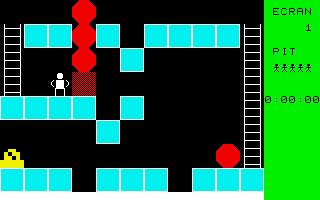
Stumbled upon a neat article on the site "Hard Core Gaming" discussing the game "Catrap", for the Game Boy, which the author of the article insisted was based on one of the "great basic games" of the early 1980s.

I think I had actually searched on "great basic games", which is probably why I found it.  One of the "goals" of my hobby is to try to bring to the MC-10 as many of the great/most classic basic games of the 8-bit era as I can.  So I was interested to see that the game didn't look overly complex in its screen graphics:

Original Version

MC-10 Version
In fact that "neon" green screen on the right hand side looked faintly VDGish.  It looked like a good prospect for a port.  Of course, it was not going to be quite that simple. Originally created in 1985 on a MZ-700 home computer by Yutaka Isokawa. The BASIC listing was published in the August 1985 issue of the magazine "Oh!MZ Publications," which hard core gamer had luckily been able to secure a scan of.  However, it was not a very good scan and the original language was quite an esoteric version of Basic, which didn't use data statements, but instead read data from a special file. Things didn't look good, but I decided to do a little further searching, and eventually I was able to uncover a French version of the same game (thank goodness again for my old highschool French), in a different version of Basic that did use DATA statements to store the 50 levels.

The original game was called "Pitman" and it is essentially a puzzle solving adventure game similar in style to Sokoban (which I have created a version for the MC-10 using the screens transferred from an OS9 text version made for the Coco that I got from the old RTSI OS9 software archive):


Pitman was very nicely programmed by Isokawa and only used the 40*24 text graphic characters of the MZ700. The original graphics were based on the use of 3X3 characters.  By reducing these to 2X2 character VDG graphic equivalents, I was able to adjust the game to the much smaller MC-10 32*16 screen.  Then it was just a matter of making sure all "scaling" factors used in the program were adjusted to the new regime.  The game also included level editor and save/load functions, which I have now fully implemented for use on both an MC-10 cassette system and Coco disk system.

Obviously the MC-10 graphics are a little more chunky than the original, but as a dedicated MC-10er, I have come to revel in the glorious chunky graphics of my favourite 8-bit machine.  After all, the visible squarish pixel is the very symbol and essence of "8-bit."  And in that regard, the MC-10 is king!

I have added the latest version of Coco Pitman to my JGGAMES5.DSK, which is available from my GitHub site: https://github.com/jggames

I've updated the title page to look more like the original and added disk directory and save features to the screen editing section of program.

Thursday, 17 January 2013

Romp Rules and Version Notes


Noticed a couple of videos of the game "Garden" on YouTube by a Bulgarian programmer (hence the colors chosen for the title screen). See:


The concept was simple enough that it seemed possible to convert to MC-10 basic.  The basic idea seemed to be that the player's character is some yob romping around someones garden, crushing the grass and picking the flowers.  In the original, it is the garden's owner who is chasing the player, which is conceivably why the owner avoids stomping on the grass, but only follows along the pathways created by the player.  Due to the limitations of the MC-10 character set I decided to make the enemy a snapping dog figure using the <=> characters.  Conceivably, in my version, the dogs have been trained somehow not to stomp the grass, hence their tendency to only follow the player's path.

Versions 1-8
Took a while to create an algorithm for the dogs' movement that was similar in effect to the original and also challenging.

Basically the algorithm checks each time the dog reaches an intersection with at least 3 passages leading off it.  Then it changes direction from the current one, to one that tracks your character.  If it reaches any impasses it chooses a new random direction and heads off.  There is a random selection every 30 or so moves to simply change direction randomly or choose a new direction based on tracking (either horizontal or vertical).

Version 9
Added the "bone" feature, which allows the player to create passages that can be used to lure the dog into finding the bone "/".  When it does, the player scores 250 points and that dog stops for good at the bone.  When that happens, a new dog is released from the top left.  The player should avoid the stationary dog, as touching it is deadly. Perhaps the player is Homer Simpson (hee hee hee), and the owner of the garden as Mr. Burns (RELEASE THE HOUNDS!)

Version 10
Fixed the capture routine so that the dog gets to chew on you a bit before the game ends (it deserves that much, after so much hard work).  Changed the grammar of the end prompt from "Take another romp?" to "Go for another romp". I was thinking of "take another walk", but I realized that in English the normal phrase would be to say "go for a romp."  Added a randomize peek at the beginning of the program, so that it doesn't start the same way when the program is run from a cold start.  Fixed the screen creation routine so that a bone will appear for every new screen.

Jim Gerrie
Cape Breton Island--"Ciad Mile Failte!"
Nova Scotia, Canada
Program developed in the month of November 2012